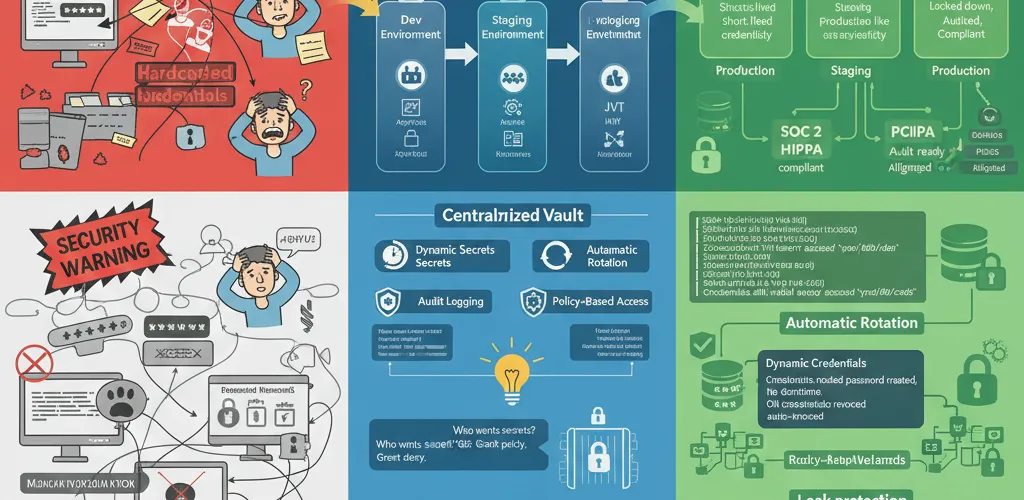
Managing secrets safely across multiple environments with HashiCorp Vault
Storing secrets in .env files, hardcoding them, or even using separate secret managers per environment creates security risks and operational chaos. Vault provides a unified, audited solution for secret generation, rotation, and access control across all your environments.
The Problem
Multi-environment secret chaos
When managing dev, staging, and production environments, secrets management becomes a headache:
- Different secrets per environment with no central tracking
- Manual rotation processes prone to human error
- No audit trail for who accessed which secrets and when
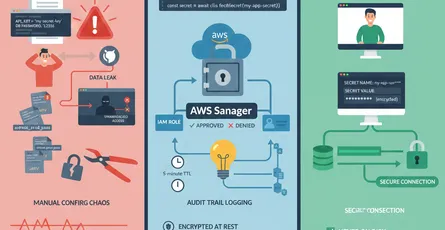
- Secrets leaking through Git history or logs
- Difficulty revoking compromised credentials instantly
The Solution
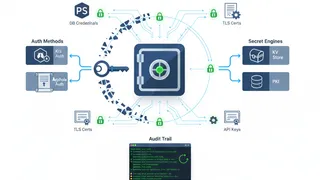
HashiCorp Vault overview
Vault is a secrets management platform that provides:
- Dynamic secrets: Generate credentials on-demand that auto-expire
- Secret rotation: Automatically rotate credentials without downtime
- Audit logging: Complete trail of all secret access and operations
- Environment isolation: Separate secrets per environment with shared policies
- Multi-auth methods: Support for AppRole, Kubernetes, IAM, JWT, and more
TL;DR
- Use HashiCorp Vault as a centralized secret backend
- Generate dynamic credentials that auto-expire
- Implement automatic rotation for long-lived secrets
- Audit all secret access across environments
Installation and setup
Start Vault with Docker
services:  vault:    image: vault:latest    container_name: vault    ports:      - "8200:8200"    environment:      VAULT_DEV_ROOT_TOKEN_ID: "root"      VAULT_DEV_LISTEN_ADDRESS: "0.0.0.0:8200"    cap_add:      - IPC_LOCK    volumes:      - vault-data:/vault/data    command: server -dev
volumes:  vault-data:
Start the Vault server:
docker-compose up -dexport VAULT_ADDR='http://localhost:8200'export VAULT_TOKEN='root'CLI examples
Basic secret storage
# Store a static secretvault kv put secret/dev/database \  username="dbuser" \  password="supersecret" \  host="db.dev.internal"
# Retrieve secretvault kv get secret/dev/database
# Get specific fieldvault kv get -field=password secret/dev/database
Organize secrets by environment
# Development secretsvault kv put secret/dev/app-api \  api_key="dev-key-12345" \  api_secret="dev-secret-67890"
# Staging secretsvault kv put secret/staging/app-api \  api_key="staging-key-abcde" \  api_secret="staging-secret-fghij"
# Production secretsvault kv put secret/prod/app-api \  api_key="prod-key-xyz123" \  api_secret="prod-secret-abc456"
Programming examples
Python: fetch secrets
import hvacimport osfrom typing import Dict, Any
class VaultClient: def __init__(self, vault_addr: str = "http://localhost:8200", token: str = None): self.client = hvac.Client(url=vault_addr, token=token or os.getenv('VAULT_TOKEN'))
def get_secret(self, path: str, field: str = None) -> Dict[str, Any]: """Fetch a secret from Vault""" response = self.client.secrets.kv.v2.read_secret_version(path=path) data = response['data']['data']
if field: return data.get(field) return data
def get_database_creds(self, environment: str) -> Dict[str, str]: """Get database credentials for specific environment""" path = f"secret/{environment}/database" return self.get_secret(path)
def get_api_keys(self, environment: str) -> Dict[str, str]: """Get API keys for specific environment""" path = f"secret/{environment}/app-api" return self.get_secret(path)
# Usageif __name__ == "__main__": vault = VaultClient()
# Get dev database credentials db_creds = vault.get_database_creds("dev") print(f"Database: {db_creds['host']}") print(f"User: {db_creds['username']}")
# Get specific field api_key = vault.get_secret("secret/prod/app-api", field="api_key") print(f"API Key: {api_key}")Node.js: fetch secrets
import * as VaultClient from 'node-vault';
class SecretManager { private vault: ReturnType<typeof VaultClient>;
constructor(address: string = 'http://localhost:8200', token: string) { this.vault = VaultClient({ apiVersion: 'v1', endpoint: address, token: token || process.env.VAULT_TOKEN, }); }
async getSecret(path: string, field?: string): Promise<any> { try { const response = await this.vault.read(path); const data = response.data.data;
if (field) { return data[field]; } return data; } catch (error) { console.error(`Failed to retrieve secret from ${path}:`, error); throw error; } }
async getDatabaseConfig(environment: string): Promise<any> { return this.getSecret(`secret/${environment}/database`); }
async getApiCredentials(environment: string): Promise<any> { return this.getSecret(`secret/${environment}/app-api`); }}
// Usage(async () => { const manager = new SecretManager('http://localhost:8200', 'root');
const dbConfig = await manager.getDatabaseConfig('dev'); console.log(`Connecting to: ${dbConfig.host}`);
const apiKey = await manager.getApiCredentials('prod'); console.log(`API Key: ${apiKey.api_key}`);})();Dynamic database credentials
Configure the database secret engine
# Enable database secrets enginevault secrets enable database
# Configure PostgreSQL connectionvault write database/config/postgresql \  plugin_name=postgresql-database-plugin \  allowed_roles="readonly,readwrite" \  connection_url="postgresql://admin:password@db.prod.internal:5432/appdb" \  username="vault_admin" \  password="vault_admin_password"
# Create readonly rolevault write database/roles/readonly \  db_name=postgresql \  creation_statements="CREATE ROLE \"{{name}}\" WITH LOGIN PASSWORD '{{password}}' VALID UNTIL '{{expiration}}'; GRANT SELECT ON ALL TABLES IN SCHEMA public TO \"{{name}}\";" \  default_ttl="1h" \  max_ttl="24h"
# Create readwrite rolevault write database/roles/readwrite \  db_name=postgresql \  creation_statements="CREATE ROLE \"{{name}}\" WITH LOGIN PASSWORD '{{password}}' VALID UNTIL '{{expiration}}'; GRANT SELECT, INSERT, UPDATE ON ALL TABLES IN SCHEMA public TO \"{{name}}\";" \  default_ttl="6h" \  max_ttl="24h"
Retrieve dynamic credentials
# Get temporary readonly credentialsvault read database/creds/readonly# Output:# Key                Value# ---                -----# lease_duration     1h# lease_id           database/creds/readonly/...# password           a-temporary-password# username           v-token-readonly-xxxxxxxx
# Get temporary readwrite credentialsvault read database/creds/readwrite
Python: use dynamic credentials
import hvacimport psycopg2from typing import Generatorimport contextlib
class DynamicDatabaseAccess: def __init__(self, vault_addr: str, vault_token: str): self.vault = hvac.Client(url=vault_addr, token=vault_token) self.db_host = os.getenv('DB_HOST', 'db.prod.internal') self.db_port = os.getenv('DB_PORT', '5432') self.db_name = os.getenv('DB_NAME', 'appdb')
def get_dynamic_credentials(self, role: str) -> dict: """Fetch temporary database credentials from Vault""" response = self.vault.secrets.database.read_dynamic_credentials(role) return response['data']
@contextlib.contextmanager def get_connection(self, role: str = 'readonly') -> Generator: """Get a database connection with dynamic credentials""" creds = self.get_dynamic_credentials(role)
conn = psycopg2.connect( host=self.db_host, port=self.db_port, database=self.db_name, user=creds['username'], password=creds['password'] )
try: yield conn finally: conn.close()
# Usagedb_access = DynamicDatabaseAccess('http://localhost:8200', 'root')
with db_access.get_connection(role='readonly') as conn: cursor = conn.cursor() cursor.execute("SELECT COUNT(*) FROM users") print(f"Total users: {cursor.fetchone()[0]}")Policy-based access control
Create policies for different roles
# Read-only access to dev/staging secretspath "secret/data/dev/*" { capabilities = ["read", "list"]}
path "secret/data/staging/*" { capabilities = ["read", "list"]}
# Deny access to productionpath "secret/data/prod/*" { capabilities = ["deny"]}
# Allow token self-renewalpath "auth/token/renew-self" { capabilities = ["update"]}# Full access to production secretspath "secret/data/prod/*" { capabilities = ["create", "read", "update", "delete", "list"]}
# Read-only access to stagingpath "secret/data/staging/*" { capabilities = ["read", "list"]}
# Database credential accesspath "database/creds/prod/*" { capabilities = ["read"]}
# Audit loggingpath "sys/audit" { capabilities = ["read"]}Apply policies
# Create policiesvault policy write dev-team policies/dev-team.hclvault policy write prod-team policies/prod-team.hcl
# Assign to users/appsvault write auth/userpass/users/jane policies="prod-team"vault write auth/userpass/users/alice policies="dev-team"
Kubernetes integration
Enable Kubernetes auth
# Enable Kubernetes authenticationvault auth enable kubernetes
# Configure Kubernetes authvault write auth/kubernetes/config \  token_reviewer_jwt=@/var/run/secrets/kubernetes.io/serviceaccount/token \  kubernetes_host="https://$KUBERNETES_SERVICE_HOST:$KUBERNETES_SERVICE_PORT" \  kubernetes_ca_cert=@/var/run/secrets/kubernetes.io/serviceaccount/ca.crt
# Create role for podsvault write auth/kubernetes/role/app-role \  bound_service_account_names=app \  bound_service_account_namespaces=default \  policies=default,app-secrets \  ttl=24h
Pod configuration
apiVersion: apps/v1kind: Deploymentmetadata: name: appspec: replicas: 2 selector: matchLabels: app: myapp template: metadata: labels: app: myapp spec: serviceAccountName: app containers: - name: myapp image: myapp:latest env: - name: VAULT_ADDR value: 'http://vault.vault.svc.cluster.local:8200' - name: VAULT_SKIP_VERIFY value: 'false' volumeMounts: - name: vault-token mountPath: /vault/secrets volumes: - name: vault-token projected: sources: - serviceAccountToken: audience: vault expirationSeconds: 3600 path: tokenAudit logging
Enable audit logging
# Enable file audit backendvault audit enable file file_path=/vault/logs/audit.log
# Enable syslog audit backendvault audit enable syslog tag="vault"
# View audit logstail -f /vault/logs/audit.log | jq '.'
Query audit logs
# Show all secret readscat /vault/logs/audit.log | jq 'select(.type == "response" and .auth.policy_results.granted_policies >= 0)'
# Show secret modificationscat /vault/logs/audit.log | jq 'select(.type == "request" and .request.operation == "write")'
# Show failed auth attemptscat /vault/logs/audit.log | jq 'select(.response.auth == null)'
Best practices
1. Use AppRole for applications
# Create AppRolevault auth enable approle
# Generate application rolevault write auth/approle/role/my-app \  token_ttl=1h \  token_max_ttl=4h \  policies="app-secrets"
# Get role IDvault read auth/approle/role/my-app/role-id
# Generate secret IDvault write -f auth/approle/role/my-app/secret-id
2. Rotate secrets regularly
# Configure auto-rotation every 30 daysvault write database/config/postgresql \ connection_url="postgresql://admin:password@db.prod.internal:5432/appdb" \ rotation_statements="ALTER ROLE \"{{name}}\" WITH PASSWORD '{{password}}';" \ rotation_period=720h3. Implement least privilege
# Only grant necessary capabilitiespath "secret/data/myapp/*" { capabilities = ["read"] # Not "update" or "delete"}