Overview
Multi-profile S3 management
Ever juggled multiple AWS accounts and needed a quick S3 bucket inventory across all of them? This Python script handles it.
Use case
Perfect for organizations managing multiple AWS accounts or developers working with different IAM roles and profiles.
The Problem
Multi-profile complexity
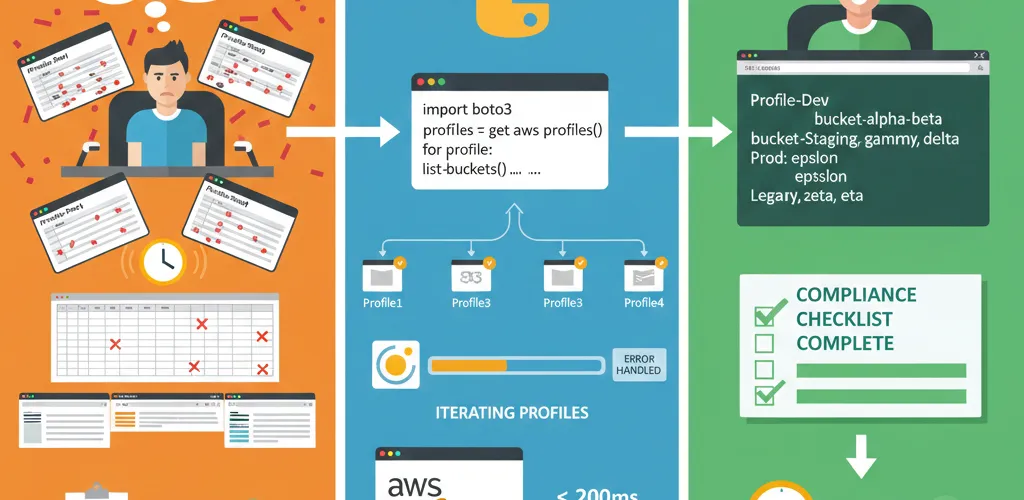
When you’re working with multiple AWS accounts or IAM roles through different profiles, getting a consolidated view of your S3 buckets can be a hassle. Switching contexts or running commands repeatedly for each profile is slow and easy to get wrong. A full inventory or audit turns into a chore.
Manual process inefficiencies
Traditional approaches require manual switching between profiles and running separate commands for each account.
The Solution
Automated profile discovery
This Python script uses Boto3 to discover all your configured AWS CLI profiles. It then iterates through each profile, attempting to list its S3 buckets. It prints a profile-by-profile breakdown and handles errors like missing credentials or access denied on a single profile, so the run finishes even in complex setups.
Detailed error handling
Gracefully handles various error conditions including missing credentials, access denied, and network issues.
Features
Key capabilities
TL;DR
- Lists S3 buckets across all configured AWS CLI profiles in one go.
- Automatically discovers available AWS profiles.
- Prints a per-profile listing of S3 buckets.
- Handles errors for individual profiles (e.g., credential issues, access denied).
Output format
Organized display showing buckets grouped by AWS profile with clear visual separation.
Code implementation
Dependencies and setup
import boto3from botocore.exceptions import NoCredentialsError, ClientErrorProfile discovery function
def get_aws_profiles(): """Get all configured AWS profiles from the AWS CLI configuration.""" try: session = boto3.Session() return session.available_profiles except Exception as e: print(f"Error getting AWS profiles: {str(e)}") return []Bucket listing function
def list_s3_buckets_for_profile(profile_name): """ Lists all S3 buckets for a specific AWS profile. Returns a list of bucket names or an empty list if an error occurs. """ buckets = [] try: session = boto3.Session(profile_name=profile_name) s3_client = session.client('s3') response = s3_client.list_buckets() if response['Buckets']: for bucket in response['Buckets']: buckets.append(bucket['Name']) except NoCredentialsError: print(f" Warning: No credentials found for profile '{profile_name}'. Skipping.") except ClientError as e: error_code = e.response.get("Error", {}).get("Code") error_message = e.response.get("Error", {}).get("Message") print(f" Warning: AWS Client Error for profile '{profile_name}' ({error_code}): {error_message}. Skipping.") except Exception as e: print(f" Warning: An unexpected error occurred for profile '{profile_name}': {e}. Skipping.") return bucketsMain display function
def display_all_s3_buckets_by_profile(): """ Fetches and displays S3 buckets for all configured AWS profiles. """ profiles = get_aws_profiles()
if not profiles: print("No AWS profiles found. Please configure your AWS CLI.") return
print(f"\nChecking S3 Buckets across {len(profiles)} AWS Profiles:") print("-" * 40)
for profile in sorted(profiles): print(f"\nProfile: {profile}") print(" S3 Buckets:") buckets = list_s3_buckets_for_profile(profile) if buckets: for bucket_name in buckets: print(f" - {bucket_name}") else: print(" No buckets or inaccessible for this profile.") print("-" * 40)
if not any(list_s3_buckets_for_profile(p) for p in profiles): print("\nNo S3 buckets found across any configured profiles or all were inaccessible.")
if __name__ == "__main__": display_all_s3_buckets_by_profile()Benefits and usage
Operational advantages
Why This Helps
This script saves time for anyone managing multiple AWS environments. It covers S3 bucket auditing, inventory tasks, and compliance checks across your whole AWS footprint in a single run. You get one view without switching profiles by hand.
Use cases
Ideal for inventory management, compliance auditing, and multi-account AWS operations.
Community Discussion
Your S3 management approaches
Your Turn
How do you manage S3 bucket information in your Python projects? Any favorite Boto3 tricks for S3 you’d like to share?
Alternative tools
Share your preferred methods for managing S3 resources across multiple AWS accounts.