Kubernetes
Kubernetes is an open-source container orchestration platform for automating deployment, scaling, and management of containerized applications.
Kubernetes is the de facto standard for container orchestration. It automates deployment, scaling, and management of containerized applications across clusters of machines. Configuration is declarative, and the control plane restarts failed containers on its own.
Key features
- Deploys containers to nodes automatically
- Restarts failed containers and replaces unhealthy pods
- Distributes traffic across pod replicas
- Rolling updates that change application versions without downtime
- Quotas and limits to control cluster resource use
- Network policies, RBAC, and secret management
- DNS-based service discovery with load balancing
- Persistent and ephemeral storage orchestration
Quick start
Install kubectl: Follow the Install and Configure kubectl section.
Access cluster: kubectl cluster-info
Create deployment: kubectl create deployment web --image=nginx
List resources: kubectl get pods,svc,deployments
Check application status: kubectl describe deployment web
Common workflows
- Deploy Application: Create Deployment with image, replicas, and resources
- Expose Service: Create Service to access pods internally or externally
- Configure Access: Set up Ingress or LoadBalancer for external traffic
- Monitor Health: Check pod status, logs, and events regularly
- Update Application: Use rolling updates or blue-green deployments
- Scale Load: Adjust replicas manually or enable HPA for automatic scaling
- Debug Issues: Examine logs, describe resources, execute debugging containers
The sections above cover pod management, deployments, services, storage, RBAC, and cluster operations.
No commands found
Try adjusting your search term
Getting Started
Core Kubernetes concepts and initial setup for beginners
Kubernetes Basics
Introduction to Kubernetes architecture and core concepts
Understand Kubernetes architecture
Shows your Kubernetes cluster endpoints and components
# Kubernetes architecture consists of:# 1. Control Plane (Master): Manages cluster state and decisions# 2. Worker Nodes: Run containerized applications# 3. Pods: Smallest deployable units (wrappers around containers)# 4. Services: Expose pods to network traffic# 5. Storage: Persistent data storage for pods
# Analogy to VMs:# Traditional: Cluster -> Node -> VM -> Application# Kubernetes: Cluster -> Node -> Pod -> Container
# Key resources:# - Pod: Single or multiple containers sharing network# - Deployment: Manages pod replicas# - Service: Network access to pods# - ConfigMap: Configuration data# - PersistentVolume: Storage resourceskubectl cluster-infoKubernetes control plane is running at https://127.0.0.1:6443CoreDNS is running at https://127.0.0.1:6443/api/v1/namespaces/kube-system/services/kube-dns:dns/proxy- Requires kubectl and KUBECONFIG configured
- Control plane manages cluster operations
- Worker nodes run actual workloads
Check cluster nodes and capacity
Lists all nodes in your cluster with their status and information
# Get list of all nodes in clusterkubectl get nodes
# Get detailed node informationkubectl get nodes -o wide
# View node resource capacities and allocationskubectl top nodes
# Describe specific nodekubectl describe node node-1kubectl get nodes -o wideNAME STATUS ROLES AGE VERSION INTERNAL-IP EXTERNAL-IPminikube Ready master 10d v1.24.0 192.168.1.1 <none>- STATUS Ready means node is healthy and accepting workloads
- Roles indicate control plane vs worker nodes
- top requires metrics-server to be installed
Verify kubectl installation and context
Verifies kubectl installation and shows active cluster context
# Check kubectl versionkubectl version --client
# View current contextkubectl config current-context
# List all available contextskubectl config get-contexts
# Switch to different contextkubectl config use-context docker-desktop
# Get cluster informationkubectl config viewkubectl version --clientClient Version: v1.26.0Kustomize Version: v4.5.4- Context determines which cluster kubectl connects to
- KUBECONFIG can contain multiple clusters
- Switch contexts for multi-cluster environments
Install and Configure kubectl
Set up kubectl CLI tool and configure cluster access
Install kubectl on Linux
Installs kubectl CLI tool required for managing Kubernetes clusters
# Download kubectl binarycurl -LO "https://dl.k8s.io/release/$(curl -L -s https://dl.k8s.io/release/stable.txt)/bin/linux/amd64/kubectl"
# Make it executablechmod +x kubectl
# Move to PATHsudo mv kubectl /usr/local/bin/
# Verify installationkubectl version --client
# Using package manager (Ubuntu/Debian)sudo apt-get updatesudo apt-get install -y kubectlkubectl version --clientClient Version: v1.26.0Kustomize Version: v4.5.4- Always download from official Kubernetes release repository
- Version should be within 1 minor version of cluster API
Configure kubectl with cloud clusters
Configures kubectl to access cloud-managed Kubernetes clusters
# AWS EKS - Get cluster configaws eks update-kubeconfig --region us-east-1 --name my-cluster
# Google GKE - Get cluster credentialsgcloud container clusters get-credentials my-cluster --zone us-central1-a
# Azure AKS - Get cluster credentialsaz aks get-credentials --resource-group myResourceGroup --name myAKSCluster
# Verify kubectl can access clusterkubectl cluster-infokubectl config viewapiVersion: v1clusters:- cluster: server: https://example.com name: my-clustercontexts:- context: cluster: my-cluster user: my-user name: my-context- Each cloud provider has specific commands for credential setup
- Kubeconfig stored in ~/.kube/config by default
Set up kubectl shell completion
Enables tab completion for kubectl commands in your shell
# Bash completionecho "source <(kubectl completion bash)" >> ~/.bashrcsource ~/.bashrc
# Zsh completionecho "source <(kubectl completion zsh)" >> ~/.zshrcsource ~/.zshrc
# Fish completionkubectl completion fish | source
# Temporary completion (current session)source <(kubectl completion bash)kubectl completion bash# bash completion for kubectl_kubectl_complete() { ... }- Cuts typing for long resource names and flags
- Available for bash, zsh, fish, and powershell
Namespaces and Basic Navigation
Organize resources using namespaces and navigate clusters
Explore and create namespaces
Lists and creates Kubernetes namespaces for resource organization
# List all namespaceskubectl get namespaces
# Create new namespacekubectl create namespace development
# Create namespace with YAMLkubectl apply -f - <<EOFapiVersion: v1kind: Namespacemetadata:  name: productionEOF
# Get default namespaces# default - for user workloads# kube-system - for system components# kube-public - world-readable resources# kube-node-lease - node heartbeatskubectl get nsNAME STATUS AGEdefault Active 10dkube-system Active 10dkube-public Active 10dkube-node-lease Active 10d- Default namespace is used if not specified
- Namespaces isolate resources within same cluster
- Good for multi-team or multi-environment setups
Set default namespace and switch between them
Sets default namespace for kubectl commands without -n flag
# Set permanent default namespacekubectl config set-context --current --namespace=development
# View current namespacekubectl config view --minify --output=jsonpath='{..namespace}'
# View resources in specific namespacekubectl get pods --namespace=productionkubectl get pods -n production  # short form
# Switch context with different namespacekubectl config use-context dev-contextkubectl config set-context --current --namespace=defaultContext "minikube" modified.- Default context is stored in ~/.kube/config
- -n flag overrides default namespace per command
View all resources across namespaces
Lists resources across all namespaces for cluster-wide visibility
# List pods across all namespaceskubectl get pods --all-namespaceskubectl get pods -A  # short form
# View services across all namespaceskubectl get svc -A
# Get all resources in all namespaceskubectl get all -A
# Describe resource in specific namespacekubectl describe pod my-pod -n productionkubectl get pods -ANAMESPACE NAME READY STATUS RESTARTSdefault nginx-pod 1/1 Running 0kube-system coredns-64897fb6d9-x8z5k 1/1 Running 0production app-deployment-abc123-xyz789 1/1 Running 1- -A flag is equivalent to --all-namespaces
- Useful for troubleshooting across entire cluster
Cluster Management
Manage cluster configuration, nodes, resources, and monitoring
Cluster Context and Configuration
Manage multiple clusters and kubeconfig contexts
Manage kubeconfig contexts and clusters
Shows all available contexts and allows switching between clusters
# View all contexts and clusterskubectl config get-contextskubectl config get-clusters
# Get current contextkubectl config current-context
# Switch to different contextkubectl config use-context another-cluster
# Create new contextkubectl config set-context production --cluster=prod-cluster --user=prod-user
# Delete contextkubectl config delete-context old-contextkubectl config get-contextsCURRENT NAME CLUSTER AUTHINFO NAMESPACE* minikube minikube minikube default docker-desktop docker-desktop docker-desktop default kind-cluster1 kind-cluster1 kind-cluster1 default- Context combines cluster, user, and namespace information
- * indicates current context
Configure cluster authentication
Manually configure cluster, user, and context settings
# Set cluster detailskubectl config set-cluster my-cluster \  --server=https://kubernetes.example.com:6443 \  --certificate-authority=/path/to/ca.crt
# Set user authenticationkubectl config set-credentials my-user \  --client-certificate=/path/to/client.crt \  --client-key=/path/to/client.key
# Create context binding user to clusterkubectl config set-context my-context \  --cluster=my-cluster \  --user=my-user \  --namespace=default
# Verify configurationkubectl config viewkubectl config viewapiVersion: v1clusters:- cluster: server: https://kubernetes.example.com:6443users:- name: my-usercontexts:- context: cluster: my-cluster user: my-user- Certificates can be base64-encoded in kubeconfig
- kubectl config view shows merged configuration
Merge kubeconfig files and manage credentials
Manage multiple kubeconfig files for different clusters
# View kubeconfig locationecho $KUBECONFIG
# Merge multiple kubeconfig filesexport KUBECONFIG=~/.kube/config:~/.kube/prod-config:/tmp/temp-configkubectl config view --merge
# Flatten kubeconfig (consolidate into single file)kubectl config view --flatten > ~/.kube/consolidated-config
# Set KUBECONFIG permanentlyecho "export KUBECONFIG=$HOME/.kube/config" >> ~/.bashrc
# Verify current kubeconfigkubectl config view --minifyecho $KUBECONFIG/home/user/.kube/config- Multiple KUBECONFIG files are separated by colon (:)
- Useful for managing dev, staging, and production clusters
Cluster Information and Monitoring
Monitor cluster health, resources, and component status
Check cluster health and component status
Shows running components and their endpoints
# Get cluster informationkubectl cluster-info
# Get system components (requires metrics-server)kubectl get componentstatuses
# Check API server and cluster versionkubectl api-versions
# List all API resources availablekubectl api-resources
# View cluster detailskubectl describe clusterkubectl cluster-infoKubernetes control plane is running at https://127.0.0.1:6443CoreDNS is running at https://127.0.0.1:6443/api/v1/namespaces/kube-system/services/kube-dns:dns/proxy- Confirms kubectl can reach the cluster
- Dump shows more detailed debug information
Monitor node resources and health
Shows CPU and memory usage for all cluster nodes
# List nodes with resource informationkubectl get nodes --show-labels
# Get node resource usagekubectl top nodes
# Describe specific node for detailskubectl describe node minikube
# Check node logs (requires SSH or specific monitoring)kubectl logs -f -n kube-system --tail=50 <pod-name>
# Get node conditionskubectl get nodes -o jsonpath='{.items[*].status.conditions}' | jq .kubectl top nodesNAME CPU(cores) CPU% MEMORY(Mi) MEMORY%minikube 245m 12% 1234Mi 32%- Requires metrics-server installed for top command
- CPU in millicores, memory in megabytes
Check persistent volume and storage status
Lists persistent storage resources in the cluster
# List persistent volumeskubectl get pv
# List persistent volume claimskubectl get pvc --all-namespaces
# Check storage classeskubectl get storageclass
# Describe specific PVkubectl describe pv pv-name
# Check PVC statuskubectl describe pvc pvc-name -n namespacekubectl get pvNAME CAPACITY ACCESS MODES RECLAIM STATUS CLAIMpv-001 10Gi RWO Delete Bound ns/pvc-001- PV is cluster-level, PVC is namespace-level
- Status should be Bound for normal operation
Node and Resource Management
Manage cluster nodes, taints, and resource quotas
Cordon and drain nodes for maintenance
Safely cordons and drains nodes for maintenance
# Cordon node (prevent new pods from scheduling)kubectl cordon node-1
# Drain node (evict all pods safely)kubectl drain node-1 --ignore-daemonsets --delete-emptydir-data
# Uncordon node (allow scheduling again)kubectl uncordon node-1
# Check node statuskubectl get nodeskubectl describe node node-1kubectl get nodesNAME STATUS ROLES AGEnode-1 Ready,SchedulingDisabled <none> 10dnode-2 Ready <none> 10d- SchedulingDisabled status indicates cordoned node
- Drain evicts pods so they shut down gracefully
Add and remove node taints
Adds and removes taints to control pod scheduling
# Add taint to node (prevents scheduling unless tolerated)kubectl taint nodes node-1 key=value:NoSchedule
# Add effect types:# NoSchedule - new pods won't be scheduled# NoExecute - existing pods will be evicted# PreferNoSchedule - prefer not to schedule but may
# Remove taint from nodekubectl taint nodes node-1 key=value:NoSchedule-
# View node taintskubectl describe node node-1 | grep Taintskubectl describe node node-1 | grep TaintsTaints: gpu=true:NoSchedule- Pods need matching tolerations to schedule on tainted nodes
- Common for GPU nodes or specialized hardware
Set resource quotas and limits per namespace
Sets resource limits for namespaces to prevent overallocation
# Create resource quota for namespacekubectl create quota myrquota --hard=pods=10,cpu=3,memory=10Gi -n development
# View resource quotaskubectl get resourcequota -n development
# Describe quota detailskubectl describe resourcequota myrquota -n development
# Create with YAML for more controlkubectl apply -f - <<EOFapiVersion: v1kind: ResourceQuotametadata: name: compute-quota namespace: developmentspec: hard: requests.cpu: "10" requests.memory: "20Gi" limits.cpu: "20" limits.memory: "40Gi"EOFkubectl get resourcequota -ANAMESPACE NAME AGE REQUEST.CPU REQUESTMEMORYdevelopment myrquota 5d 500m / 3 2Gi / 10Gi- Quotas prevent namespace from consuming excessive cluster resources
- Pods larger than quota cannot be created
Pod Management
Create, manage, inspect, and debug Kubernetes pods
Creating and Listing Pods
Create pods imperatively and declaratively, list and filter them
Create pods imperatively with kubectl run
Creates pods using imperative kubectl run command
# Create simple pod from imagekubectl run nginx-pod --image=nginx
# Create pod with port mappingkubectl run web --image=nginx --port=8080
# Create pod with resource requests/limitskubectl run app --image=myapp --requests=cpu=100m,memory=128Mi --limits=cpu=500m,memory=512Mi
# Create pod with commandkubectl run busybox --image=busybox --command -- sleep 3600
# Create pod in specific namespacekubectl run test-pod --image=alpine -n development
# Create pod and output YAML (dry-run)kubectl run nginx-pod --image=nginx --dry-run=client -o yamlkubectl run test-pod --image=alpine --dry-run=client -o yamlapiVersion: v1kind: Podmetadata: creationTimestamp: null name: test-podspec: containers: - image: alpine name: test-pod- Imperative approach is fast for quick testing
- Use dry-run to preview YAML before creating
Create pods declaratively with YAML manifests
Creates pods using declarative YAML manifests
# Create pod from YAML filekubectl apply -f pod.yaml
# Create pod from inline YAMLkubectl apply -f - <<EOFapiVersion: v1kind: Podmetadata:  name: web-pod  namespace: default  labels:    app: webspec:  containers:  - name: nginx    image: nginx:latest    ports:    - containerPort: 80    resources:      requests:        cpu: 100m        memory: 128Mi      limits:        cpu: 500m        memory: 512Mi  - name: sidecar    image: busybox    command: ['sleep', '3600']EOF
# Verify pod creationkubectl get podskubectl get podsNAME READY STATUS RESTARTS AGEweb-pod 2/2 Running 0 2m- Declarative approach is preferred for reproducibility
- YAML files can be version controlled
- Multiple containers can run in same pod
List and filter pods
Lists pods with various filtering and output options
# List pods in current namespacekubectl get pods
# List pods with detailed infokubectl get pods -o wide
# List pods across all namespaceskubectl get pods -A
# List pods with labelskubectl get pods --show-labels
# Filter pods by labelkubectl get pods -l app=web
# Filter by multiple labelskubectl get pods -l app=web,tier=frontend
# List pods with custom columnskubectl get pods -o custom-columns=NAME:metadata.name,STATUS:status.phase,IP:status.podIPkubectl get pods -o wideNAME STATUS IP NODE NOMINATEDweb-pod Running 10.244.0.5 minikube <none>- Default shows only current namespace
- -o flag controls output format (json, yaml, custom-columns)
Inspecting and Debugging Pods
Describe, view logs, and debug pod issues
Describe pods and view details
Shows detailed pod information including events and status
# Get basic information about podkubectl get pod web-pod
# Get detailed pod informationkubectl describe pod web-pod
# View pod definition in YAMLkubectl get pod web-pod -o yaml
# View pod in JSON formatkubectl get pod web-pod -o json
# Extract specific fields with JSONPathkubectl get pod web-pod -o jsonpath='{.status.phase}'kubectl get pod web-pod -o jsonpath='{.spec.containers[0].image}'kubectl describe pod web-podName: web-podNamespace: defaultStatus: RunningIP: 10.244.0.5Containers: nginx: Image: nginx:latest State: Running- describe shows useful events and error messages
- Events help identify why pods fail to start
View pod logs and stream output
Shows container logs for debugging application issues
# View logs from podkubectl logs web-pod
# View logs from specific container in multi-container podkubectl logs web-pod -c nginx
# Stream logs in real-timekubectl logs -f web-pod
# View logs from previous container (crashed pods)kubectl logs web-pod --previous
# Show logs with timestampskubectl logs web-pod --timestamps=true
# Tail last 50 lineskubectl logs web-pod --tail=50
# View logs from deployment podskubectl logs -l app=web --max-log-requests=10kubectl logs web-pod --tail=20192.168.1.1 - - [28/Feb/2025:10:30:00] "GET / HTTP/1.1" 200 612192.168.1.2 - - [28/Feb/2025:10:30:01] "GET /index.html HTTP/1.1" 200 612- -f flag tails logs in real-time like tail -f
- --previous shows logs from before container restart
Interactive debugging and shell access
Executes commands and provides shell access to running pods
# Execute command in running podkubectl exec web-pod -- ls -la
# Get interactive shell in podkubectl exec -it web-pod -- /bin/bashkubectl exec -it web-pod -- /bin/sh
# Execute command in specific containerkubectl exec -it web-pod -c nginx -- /bin/bash
# Run debugging sidecar in podkubectl debug web-pod -it --image=busybox
# Copy files from podkubectl cp web-pod:/var/www/html/index.html ./index.html# Copy files to podkubectl cp ./config.yaml web-pod:/etc/config.yamlkubectl exec -it web-pod -- hostnameweb-pod- -i flag keeps stdin open, -t allocates tty
- Useful for runtime troubleshooting and inspection
Deleting and Cleaning Up Pods
Delete pods and manage pod lifecycle
Delete single and multiple pods
Deletes pods from the cluster
# Delete single podkubectl delete pod web-pod
# Delete multiple pods by namekubectl delete pod web-pod app-pod db-pod
# Delete all pods in namespacekubectl delete pods --all
# Delete all pods in all namespaceskubectl delete pods -A --all
# Delete with confirmationkubectl delete pod web-pod # will prompt for confirmationkubectl delete pod web-podpod "web-pod" deleted- Delete operations are immediate (use graceful termination)
- Bare pods are not recreated; use Deployments for self-healing
Graceful pod termination and force delete
Gracefully terminates pods with shutdown timeout
# Delete with grace period (seconds to shutdown cleanly)kubectl delete pod web-pod --grace-period=30
# Force delete immediately (no grace period)kubectl delete pod web-pod --grace-period=0 --force
# Delete using label selectorkubectl delete pods -l app=web
# Delete using field selectorkubectl delete pods --field-selector=status.phase=Failed
# Check termination status during deletionkubectl get pod web-pod --watchkubectl delete pod web-pod --grace-period=10pod "web-pod" deleted- Default grace period is 30 seconds
- Pod has time to close connections and save state
Deployment Management
Deploy applications, manage replicas, and perform rolling updates
Creating Deployments
Create deployments imperatively and declaratively
Create deployments imperatively
Creates deployments using imperative kubectl commands
# Create deployment from imagekubectl create deployment web --image=nginx
# Create deployment with replicaskubectl create deployment web --image=nginx --replicas=3
# Create deployment and save YAMLkubectl create deployment web --image=nginx --dry-run=client -o yaml > web-deployment.yaml
# Create deployment with portkubectl run web --image=nginx --port=80 --replicas=3
# Verify deployment creationkubectl get deploymentskubectl get podskubectl create deployment web --image=nginx --replicas=3deployment.apps/web created- create is imperative, while apply is declarative
- Deployments automatically create ReplicaSet
Create deployments with YAML manifests
Creates deployments declaratively with full control
# Create deployment from YAMLkubectl apply -f - <<EOFapiVersion: apps/v1kind: Deploymentmetadata:  name: web-deployment  labels:    app: webspec:  replicas: 3  selector:    matchLabels:      app: web  template:    metadata:      labels:        app: web    spec:      containers:      - name: nginx        image: nginx:1.21        ports:        - containerPort: 80        resources:          requests:            cpu: 100m            memory: 128Mi          limits:            cpu: 500m            memory: 512Mi        livenessProbe:          httpGet:            path: /            port: 80          initialDelaySeconds: 30          periodSeconds: 10EOF
# List deploymentskubectl get deploymentskubectl get deployments -o wideNAME READY UP-TO-DATE AVAILABLE AGEweb-deployment 3/3 3 3 2m- YAML approach is reproducible and version-controllable
- spec.replicas defines number of pod replicas
- selector must match template labels
Create deployments with health checks
Creates deployments with health checks for better reliability
# Create deployment with liveness and readiness probeskubectl apply -f - <<EOFapiVersion: apps/v1kind: Deploymentmetadata: name: app-deploymentspec: replicas: 2 selector: matchLabels: app: app template: metadata: labels: app: app spec: containers: - name: app image: myapp:v1 ports: - containerPort: 8080 livenessProbe: httpGet: path: /health port: 8080 initialDelaySeconds: 10 periodSeconds: 10 readinessProbe: httpGet: path: /ready port: 8080 initialDelaySeconds: 5 periodSeconds: 5EOFkubectl describe deployment app-deploymentName: app-deploymentReplicas: 2 desired | 2 updated | 2 readyStrategy: RollingUpdate- Liveness probe restarts unhealthy containers
- Readiness probe controls traffic to pods
Scaling Deployments
Scale deployments up and down dynamically
Manually scale deployments
Scales deployments manually by changing replica count
# Get deployment infokubectl get deployments
# Scale deployment to 5 replicaskubectl scale deployment web-deployment --replicas=5
# Scale multiple deploymentskubectl scale deployment web-deployment app-deployment --replicas=3
# Verify scalingkubectl get deploymentskubectl get pods
# Scale down to 0 (stop deployment)kubectl scale deployment web-deployment --replicas=0kubectl scale deployment web-deployment --replicas=5deployment.apps/web-deployment scaled- Scaling is immediate
- Previous pods will be terminated gracefully
Set up horizontal pod autoscaling
Sets up automatic scaling based on metrics
# Create HPA imperativelykubectl autoscale deployment web-deployment --min=1 --max=10 --cpu-percent=80
# View HPA statuskubectl get hpa
# Describe HPA detailskubectl describe hpa web-deployment
# Create HPA with YAML for more controlkubectl apply -f - <<EOFapiVersion: autoscaling/v2kind: HorizontalPodAutoscalermetadata: name: web-hpaspec: scaleTargetRef: apiVersion: apps/v1 kind: Deployment name: web-deployment minReplicas: 2 maxReplicas: 10 metrics: - type: Resource resource: name: cpu target: type: Utilization averageUtilization: 80EOFkubectl get hpaNAME REFERENCE TARGETS MINPODS MAXPODSweb-hpa Deployment/web-deployment 45%/80% 2 10- Requires metrics-server for CPU/memory metrics
- HPA v2 supports custom metrics
Monitor scaling events and history
Monitors horizontal pod autoscaling events
# Monitor scaling in real-timekubectl get hpa --watch
# Check HPA eventskubectl describe hpa web-hpa
# View scaling historykubectl get events --field-selector involvedObject.name=web-deployment
# Check deployment historykubectl rollout history deployment web-deploymentkubectl get hpa --watchNAME REFERENCE TARGETS MINPODS MAXPODS REPLICAS AGEweb-hpa Deployment/web-deploy 88%/80% 2 10 8 3m- HPA cooldown prevents rapid scaling churn
- Monitor targets to verify autoscaling behavior
Updating and Rolling Back Deployments
Update application versions and manage rollouts
Update deployment images
Updates deployment image to new version
# Update image in deploymentkubectl set image deployment/web-deployment nginx=nginx:1.22
# Update multiple containerskubectl set image deployment/app app=myapp:v2 sidecar=sidecar:v1 --record
# Update from filekubectl apply -f - <<EOFapiVersion: apps/v1kind: Deploymentmetadata:  name: web-deploymentspec:  template:    spec:      containers:      - name: nginx        image: nginx:1.22EOF
# Watch rollout progresskubectl rollout status deployment/web-deploymentkubectl set image deployment/web-deployment nginx=nginx:1.22deployment.apps/web-deployment image updated- Triggers rolling update by default
- Old pods are gradually replaced with new version
Perform rolling updates and monitor progress
Monitors and controls rolling update process
# Apply updated deploymentkubectl apply -f web-deployment.yaml
# Watch rollout statuskubectl rollout status deployment/web-deployment
# Check rollout historykubectl rollout history deployment/web-deployment
# View specific revision detailskubectl rollout history deployment/web-deployment --revision=2
# Pause rollout if issues detectedkubectl rollout pause deployment/web-deployment
# Resume paused rolloutkubectl rollout resume deployment/web-deploymentkubectl rollout status deployment/web-deploymentdeployment "web-deployment" successfully rolled out- Pause allows verification before continuing update
- History shows all previous revisions
Rollback deployments to previous versions
Reverts deployment to previous working version
# Rollback to previous revisionkubectl rollout undo deployment/web-deployment
# Rollback to specific revisionkubectl rollout undo deployment/web-deployment --to-revision=2
# Check rollback statuskubectl rollout status deployment/web-deployment
# Verify rollback with describekubectl describe deployment web-deployment
# Check pod images to confirm rollbackkubectl get pods -o widekubectl rollout undo deployment/web-deploymentdeployment.apps/web-deployment rolled back- Undo creates new ReplicaSet with old version
- Useful for quick recovery from bad deployments
Service & Ingress
Expose applications with Services and Ingress
Creating Services
Expose pods with ClusterIP, NodePort, and LoadBalancer services
Create services imperatively
Creates services to expose deployments within or outside cluster
# Expose deployment as ClusterIP servicekubectl expose deployment web-deployment --type=ClusterIP --port=80
# Expose as NodePort servicekubectl expose deployment web-deployment --type=NodePort --port=80 --target-port=8080
# Expose as LoadBalancer servicekubectl expose deployment web-deployment --type=LoadBalancer --port=80
# List created serviceskubectl get svc
# Get service detailskubectl describe svc web-deploymentkubectl expose deployment web-deployment --type=ClusterIP --port=80service/web-deployment exposed- ClusterIP: internal only
- NodePort: accessible on node IP
- LoadBalancer: managed external IP
Create services with YAML
Creates services declaratively with full control
# Create ClusterIP servicekubectl apply -f - <<EOFapiVersion: v1kind: Servicemetadata:  name: web-servicespec:  type: ClusterIP  selector:    app: web  ports:  - port: 80    targetPort: 8080    protocol: TCPEOF
# Create NodePort servicekubectl apply -f - <<EOFapiVersion: v1kind: Servicemetadata:  name: web-nodeportspec:  type: NodePort  selector:    app: web  ports:  - port: 80    targetPort: 8080    nodePort: 30080EOF
# Create LoadBalancer servicekubectl apply -f - <<EOFapiVersion: v1kind: Servicemetadata: name: web-lbspec: type: LoadBalancer selector: app: web ports: - port: 80 targetPort: 8080EOFkubectl get svcNAME TYPE CLUSTER-IP PORT(S)web-service ClusterIP 10.0.0.1 80/TCP- selector determines which pods receive traffic
- targetPort is container port, port is service port
List and inspect services
Lists services and their endpoints
# List serviceskubectl get svc
# List in all namespaceskubectl get svc -A
# Get service endpointskubectl get endpoints
# Describe service detailskubectl describe svc web-service
# Get service YAMLkubectl get svc web-service -o yaml
# Watch for external IP (LoadBalancer)kubectl get svc -wkubectl get svc -o wideNAME TYPE SELECTOR IP EXTERNAL-IPweb-service ClusterIP app=web 10.0.0.1 <none>- Endpoints show which pods the service routes to
- EXTERNAL-IP may take time for LoadBalancer type
Setting up Ingress
Configure Ingress for HTTP/HTTPS routing
Create basic Ingress routes
Creates basic Ingress for routing HTTP traffic
# Create simple path-based Ingresskubectl apply -f - <<EOFapiVersion: networking.k8s.io/v1kind: Ingressmetadata:  name: web-ingressspec:  rules:  - http:      paths:      - path: /        pathType: Prefix        backend:          service:            name: web-service            port:              number: 80EOF
# List ingresseskubectl get ingress
# Get Ingress IP addresskubectl get ingress -o widekubectl get ingressNAME CLASS HOSTS ADDRESS PORTSweb-ingress nginx * 192.168.1.1 80- Requires Ingress Controller (nginx, traefik, etc.)
- Address is Ingress Controller's IP
Configure hostname-based routing
Routes different hosts to different services
# Create host-based Ingresskubectl apply -f - <<EOFapiVersion: networking.k8s.io/v1kind: Ingressmetadata: name: web-ingressspec: rules: - host: example.com http: paths: - path: / pathType: Prefix backend: service: name: web-service port: number: 80 - host: api.example.com http: paths: - path: / pathType: Prefix backend: service: name: api-service port: number: 8080EOFkubectl describe ingress web-ingressName: web-ingressRules: Host Path Backends example.com / web-service:80 api.example.com / api-service:8080- Requires DNS pointing to Ingress IP
- Multiple rules for VHOST configuration
Configure TLS termination with Ingress
Configures HTTPS/TLS termination for Ingress
# Create TLS secretkubectl create secret tls web-tls --cert=cert.pem --key=key.pem
# Create Ingress with TLSkubectl apply -f - <<EOFapiVersion: networking.k8s.io/v1kind: Ingressmetadata:  name: web-ingress-tlsspec:  tls:  - hosts:    - example.com      secretName: web-tls  rules:  - host: example.com    http:      paths:      - path: /        pathType: Prefix        backend:          service:            name: web-service            port:              number: 80EOF
# Verify TLS setupkubectl describe ingress web-ingress-tlskubectl get secretsNAME TYPE DATA AGEweb-tls kubernetes.io/tls 2 3m- TLS certificate stored as Secret
- Ingress Controller terminates SSL
Port Forwarding and Debugging
Forward local ports to cluster resources for debugging
Forward local port to pod
Creates local port forward to pod
# Forward local to podkubectl port-forward pod/web-pod 8000:80
# Forward with background processkubectl port-forward pod/web-pod 8000:80 &
# Forward to specific pod in deploymentkubectl port-forward deployment/web-deployment 8000:80
# Forward with address bindingkubectl port-forward pod/web-pod 127.0.0.1:8000:80
# Forward random local portkubectl port-forward pod/web-pod :80kubectl port-forward pod/web-pod 8000:80 &Forwarding from 127.0.0.1:8000 -> 80Forwarding from [::1]:8000 -> 80- Access pod at localhost:8000 from host
- Useful for testing without exposing service
Access services through port forwarding
Forwards to Service which routes to backend pods
# Forward to servicekubectl port-forward service/web-service 8000:80
# Forward to service in specific namespacekubectl port-forward -n production service/db-service 5432:5432
# Forward multiple portskubectl port-forward pod/app 8000:8000 8080:8080
# Kill port forward# Use Ctrl+C or kill processps aux | grep port-forwardkill <pid>kubectl port-forward service/web-service 8000:80Forwarding from 127.0.0.1:8000 -> 80- Service provides load balancing across pods
- Random pod is selected if multiple exist
Storage Management
Manage persistent storage with volumes and storage classes
Persistent Volumes and Claims
Create and manage persistent storage
Create persistent volumes and claims
Creates persistent storage volumes and claims
# Create Persistent Volumekubectl apply -f - <<EOFapiVersion: v1kind: PersistentVolumemetadata:  name: pv-001spec:  capacity:    storage: 10Gi  accessModes:    - ReadWriteOnce  persistentVolumeReclaimPolicy: Retain  storageClassName: manual  hostPath:    path: /data/pv-001EOF
# Create Persistent Volume Claimkubectl apply -f - <<EOFapiVersion: v1kind: PersistentVolumeClaimmetadata:  name: pvc-001  namespace: defaultspec:  accessModes:    - ReadWriteOnce  storageClassName: manual  resources:    requests:      storage: 5GiEOF
# List PVs and PVCskubectl get pvkubectl get pvckubectl get pv,pvcNAME CAPACITY ACCESSMODES STATUS CLAIMpv-001 10Gi RWO Bound default/pvc-001- PV is cluster resource, PVC is namespace resource
- Status Bound means PVC successfully claimed PV
Use volumes in pod specifications
Mounts persistent volume in pod using PVC
# Create pod with PVC volumekubectl apply -f - <<EOFapiVersion: v1kind: Podmetadata:  name: data-appspec:  containers:  - name: app    image: busybox    command: ['sleep', '3600']    volumeMounts:    - name: data-volume      mountPath: /data  volumes:  - name: data-volume    persistentVolumeClaim:      claimName: pvc-001EOF
# Verify PVC is mountedkubectl get pod data-app -o yaml | grep -A5 volumeskubectl describe pod data-app | grep -A5 MountsMounts: /data from data-volume (rw)- mountPath is where volume appears in container
- Volume must exist or pod will not start
Manage storage lifecycle
Manages PV/PVC lifecycle and reclamation policies
# Check PVC detailskubectl describe pvc pvc-001
# View PV detailskubectl describe pv pv-001
# Delete PVCkubectl delete pvc pvc-001
# Delete PVkubectl delete pv pv-001
# Check reclaim policy behavior# - Retain: Keep PV after PVC deletion# - Delete: Remove PV after PVC deletion# - Recycle: Clear PV data (deprecated)kubectl describe pvc pvc-001Name: pvc-001Status: BoundVolume: pv-001Capacity: 5Gi- Reclaim policy determines what happens after PVC deletion
- Retain preserves data for manual recovery
Storage Classes and Dynamic Provisioning
Use storage classes for dynamic volume provisioning
Create and list storage classes
Creates storage classes for automatic volume provisioning
# Create storage classkubectl apply -f - <<EOFapiVersion: storage.k8s.io/v1kind: StorageClassmetadata:  name: fast-storageprovisioner: kubernetes.io/aws-ebsparameters:  type: gp3  iops: "3000"  throughput: "125"reclaimPolicy: DeleteallowVolumeExpansion: trueEOF
# List storage classeskubectl get storageclass
# Set default storage classkubectl patch storageclass fast-storage -p '{"metadata": {"annotations":{"storageclass.kubernetes.io/is-default-class":"true"}}}'kubectl get storageclassNAME PROVISIONER RECLAIMPOLICYfast-storage kubernetes.io/aws-ebs Delete- Provisioner depends on cloud provider
- Parameters vary by provisioner
Use storage class in PVC
Automatically provisions PV when PVC is created
# Create PVC using storage classkubectl apply -f - <<EOFapiVersion: v1kind: PersistentVolumeClaimmetadata:  name: app-storagespec:  accessModes:    - ReadWriteOnce  storageClassName: fast-storage  resources:    requests:      storage: 50GiEOF
# Monitor dynamic PV creationkubectl get pv -wkubectl get pvcNAME STATUS VOLUME CAPACITYapp-storage Bound pvc-abc123 50Gi- Storage class provisioner automatically creates PV
- No need to manually create PV first
Expand persistent volumes
Expands PVC size without downtime
# Edit PVC to increase sizekubectl patch pvc app-storage -p '{"spec":{"resources":{"requests":{"storage":"100Gi"}}}}'
# Or edit directlykubectl edit pvc app-storage
# Monitor expansion progresskubectl describe pvc app-storage
# Verify expansion in podkubectl exec -it <pod> -- df /datakubectl describe pvc app-storageName: app-storageCapacity: 100Gi- allowVolumeExpansion must be true in StorageClass
- Some filesystems require filesystem expansion in pod
Volume Types and EmptyDir
Use different volume types for various scenarios
Use emptyDir and hostPath volumes
Uses emptyDir for temporary storage and hostPath for node access
# Create pod with emptyDir and hostPathkubectl apply -f - <<EOFapiVersion: v1kind: Podmetadata: name: app-with-volumesspec: containers: - name: app image: nginx volumeMounts: - name: cache mountPath: /cache - name: host-data mountPath: /host-data volumes: - name: cache emptyDir: {} - name: host-data hostPath: path: /data type: DirectoryEOFkubectl get pod app-with-volumes -o yamlvolumes:- name: cache emptyDir: {}- emptyDir deleted when pod terminates
- hostPath accesses node filesystem
Mount ConfigMaps and Secrets as volumes
Mounts ConfigMaps and Secrets as volumes
# Create ConfigMapkubectl create configmap app-config --from-literal=key1=value1
# Create Secretkubectl create secret generic app-secret --from-literal=password=secret
# Create pod mounting bothkubectl apply -f - <<EOFapiVersion: v1kind: Podmetadata: name: app-with-configspec: containers: - name: app image: busybox command: ['sleep', '3600'] volumeMounts: - name: config mountPath: /etc/config - name: secret mountPath: /etc/secrets volumes: - name: config configMap: name: app-config - name: secret secret: secretName: app-secretEOFkubectl get configmap,secretNAME DATA AGEconfigmap/app-config 1 2m- ConfigMap/Secret updates appear in mounted files
- Good for configuration without pod restart
Security & RBAC
Secure cluster with authentication, authorization, and policies
RBAC Roles and Bindings
Control access with Roles and RoleBindings
Create RBAC roles and bindings
Creates RBAC roles and grants permissions to service accounts
# Create service accountkubectl create serviceaccount app-sa -n development
# Create role with permissionskubectl apply -f - <<EOFapiVersion: rbac.authorization.k8s.io/v1kind: Rolemetadata:  name: pod-reader  namespace: developmentrules:- apiGroups: [""]  resources: ["pods"]  verbs: ["get", "list", "watch"]- apiGroups: [""]  resources: ["pods/logs"]  verbs: ["get"]EOF
# Create role bindingkubectl apply -f - <<EOFapiVersion: rbac.authorization.k8s.io/v1kind: RoleBindingmetadata:  name: pod-reader-binding  namespace: developmentroleRef:  apiGroup: rbac.authorization.k8s.io  kind: Role  name: pod-readersubjects:- kind: ServiceAccount  name: app-sa  namespace: developmentEOF
# List RBAC resourceskubectl get roles,rolebindings -n developmentkubectl get serviceaccounts,roles,rolebindings -n developmentNAME SECRETS AGEserviceaccount/app-sa 1 2mNAME CREATED ATrole.rbac...pod-reader 2m- verbs define allowed actions (get, list, create, delete)
- apiGroups depend on resource type (empty = core API)
Create ClusterRoles for cluster-wide permissions
Grants cluster-wide permissions across all namespaces
# Create cluster rolekubectl apply -f - <<EOFapiVersion: rbac.authorization.k8s.io/v1kind: ClusterRolemetadata:  name: node-readerrules:- apiGroups: [""]  resources: ["nodes"]  verbs: ["get", "list", "watch"]- apiGroups: [""]  resources: ["nodes/stats"]  verbs: ["get"]EOF
# Create cluster role bindingkubectl apply -f - <<EOFapiVersion: rbac.authorization.k8s.io/v1kind: ClusterRoleBindingmetadata: name: node-reader-bindingroleRef: apiGroup: rbac.authorization.k8s.io kind: ClusterRole name: node-readersubjects:- kind: ServiceAccount name: monitoring-sa namespace: monitoringEOFkubectl get clusterroles,clusterrolebindingsNAME CREATED ATclusterrole.rbac.../monitoring-binding 2m- ClusterRole is cluster-scoped, not namespace-scoped
- Use for cluster admins and system components
Check permissions and debug RBAC
Verifies RBAC permissions and troubleshoots access issues
# Check what user can dokubectl auth can-i get pods -n development --as=system:serviceaccount:development:app-sa
# Check multiple permissionskubectl auth can-i create deployments -n defaultkubectl auth can-i delete pods -n default
# List all role bindings for userkubectl get rolebinding,clusterrolebinding -A
# Describe role to see permissionskubectl describe role pod-reader -n developmentkubectl auth can-i get pods --as=system:serviceaccount:development:app-sayes- can-i helps verify permissions before assigning access
- Format: system:serviceaccount:namespace:name
Network Policies
Control network traffic with network policies
Create network policies for traffic control
Creates network policies to restrict traffic
# Create deny-all network policykubectl apply -f - <<EOFapiVersion: networking.k8s.io/v1kind: NetworkPolicymetadata:  name: deny-all  namespace: productionspec:  podSelector: {}  policyTypes:  - Ingress  - EgressEOF
# Create allow policy for specific podskubectl apply -f - <<EOFapiVersion: networking.k8s.io/v1kind: NetworkPolicymetadata: name: allow-web-traffic namespace: productionspec: podSelector: matchLabels: app: web policyTypes: - Ingress ingress: - from: - podSelector: matchLabels: role: frontend ports: - protocol: TCP port: 80EOFkubectl get networkpolicies -n productionNAME POD-SELECTOR AGEdeny-all <none> 2mallow-web-traffic app=web 1m- NetworkPolicy requires network plugin with support
- podSelector: {} matches all pods
Configure egress policies
Restricts outbound traffic from pods
# Allow specific egress traffickubectl apply -f - <<EOFapiVersion: networking.k8s.io/v1kind: NetworkPolicymetadata: name: allow-egress namespace: productionspec: podSelector: matchLabels: app: api policyTypes: - Egress egress: - to: - podSelector: matchLabels: app: database ports: - protocol: TCP port: 5432 - to: - namespaceSelector: matchLabels: name: kube-system ports: - protocol: UDP port: 53EOFkubectl describe networkpolicy allow-egress -n productionName: allow-egressNamespace: productionEgress: To: app=database, port: 5432- Egress allows specifying allowed destination pods
- DNS access usually required for pod-to-pod communication
Secrets and Secret Management
Securely store and manage sensitive data
Create and manage secrets
Creates secrets to store sensitive data
# Create secret from literalskubectl create secret generic db-secret \  --from-literal=user=admin \  --from-literal=password=secretpass
# Create secret from filekubectl create secret generic app-config \  --from-file=config.yaml
# Create docker registry secretkubectl create secret docker-registry regcred \  --docker-server=myregistry.com \  --docker-username=user \  --docker-password=pass
# List secretskubectl get secretskubectl get secretsNAME TYPE DATA AGEdb-secret Opaque 2 2mapp-config Opaque 1 1m- Secrets are base64-encoded, not encrypted by default
- Consider using encryption at rest in production
Use secrets in pod specifications
Uses secrets as environment variables in pods
# Create pod using secret as environment variableskubectl apply -f - <<EOFapiVersion: v1kind: Podmetadata:  name: app-with-secretspec:  containers:  - name: app    image: myapp    env:    - name: DB_USER      valueFrom:        secretKeyRef:          name: db-secret          key: user    - name: DB_PASSWORD      valueFrom:        secretKeyRef:          name: db-secret          key: password  imagePullSecrets:  - name: regcredEOF
# Verify secret is appliedkubectl describe pod app-with-secretkubectl get pod app-with-secret -o yamlenv:- name: DB_USER valueFrom: secretKeyRef: name: db-secret key: user- imagePullSecrets for private registry authentication
- Secret data injected at runtime
View and update secrets
Views and manages secrets
# View decoded secretkubectl get secret db-secret -o jsonpath='{.data.password}' | base64 -d
# Edit secretkubectl edit secret db-secret
# Delete secretkubectl delete secret db-secret
# Get secret as YAMLkubectl get secret db-secret -o yamlkubectl describe secret db-secretName: db-secretType: OpaqueDatauser: 5 bytespassword: 10 bytes- Base64 decoding shows actual values
- Be careful with secret exposure in logs
Advanced Operations
Logging, debugging, resource management, and advanced queries
Logging and Debugging
Collect and analyze logs for troubleshooting
Advanced logging and filtering
Gets detailed logs with filtering and streaming
# Get logs from all containers in podkubectl logs pod-name --all-containers=true
# Get logs from previous pod instancekubectl logs pod-name --previous
# Stream logs with timestampskubectl logs pod-name --timestamps=true -f
# Get logs from specific time rangekubectl logs pod-name --since=1hkubectl logs pod-name --since-time='2025-02-28T10:00:00Z'
# Get logs from multiple podskubectl logs -f -l app=web --max-log-requests=10
# Tail specific number of lineskubectl logs pod-name --tail=100kubectl logs -f pod-name --tail=502025-02-28T10:30:01.123Z INFO Starting application2025-02-28T10:30:02.456Z INFO Connected to database- -f flag streams logs in real-time
- --previous useful for crashed containers
Describe and inspect resources for debugging
Examines resource details and troubleshoots issues
# Get full resource detailskubectl describe pod pod-name
# Get resource eventskubectl get events
# Watch resource for changeskubectl get pods --watch
# Get events for specific resourcekubectl get events --field-selector involvedObject.name=pod-name
# Describe deployment to see replica statuskubectl describe deployment web-deployment
# Check resource conditionskubectl get pod pod-name -o jsonpath='{.status.conditions}' | jq .kubectl describe pod pod-nameName: pod-nameStatus: RunningConditions: Type Status Reason Ready True ContainersReady- Events show resource state changes
- Conditions show readiness and health status
Advanced debugging with temporary containers
Creates temporary debugging containers
# Create debug container in running podkubectl debug pod-name -it --image=busybox
# Debug specific containerkubectl debug pod-name -c container-name -it --image=busybox
# Debug with node accesskubectl debug node/node-name -it --image=ubuntu
# Create copy of pod for debuggingkubectl debug pod-name -it --copy-to=debug-pod
# Share process namespace for debuggingkubectl debug pod-name --target=container-namekubectl debug pod-name -it --image=busyboxDebugger started, running in pod-name ephemeral-debug-xyz/ #- Debug containers have tools for troubleshooting
- Copy-to creates standalone pod for destructive testing
JSONPath Queries and Output Formatting
Extract specific data with JSONPath queries
Extract data with JSONPath
Extracts specific fields using JSONPath syntax
# Get pod nameskubectl get pods -o jsonpath='{.items[*].metadata.name}'
# Get pod IPskubectl get pods -o jsonpath='{.items[*].status.podIP}'
# Get image names from deploymentkubectl get deployment web -o jsonpath='{.spec.template.spec.containers[*].image}'
# Get container names and imageskubectl get pods -o jsonpath='{.items[*].spec.containers[*].name}'
# Format output with custom columnskubectl get pods -o jsonpath='{range .items[*]}{.metadata.name}{"\t"}{.status.phase}{"\n"}{end}'kubectl get pods -o jsonpath='{.items[*].metadata.name}'pod1 pod2 pod3- jsonpath extracts nested data
- Can combine with other tools like awk
Custom columns and wide output
Creates custom output columns for better readability
# Define custom columnskubectl get pods \  -o custom-columns=NAME:.metadata.name,READY:.status.conditions[?(@.type=="Ready")].status,IMAGE:.spec.containers[0].image,IP:.status.podIP
# Format with custom columns shorthandkubectl get pods --sort-by=.metadata.creationTimestamp
# Get pods with sorted outputkubectl get pods --sort-by='{.status.phase}'
# Wide format (standard custom columns)kubectl get pods -o widekubectl get pods -o custom-columns=NAME:.metadata.name,STATUS:.status.phase,IP:.status.podIPNAME STATUS IPpod1 Running 10.244.0.1pod2 Running 10.244.0.2- Custom columns can format complex nested data
- Sorting by specific fields helps organize output
Complex JSONPath queries with filters
Filters resources based on conditions in JSONPath
# Get pods that are currently runningkubectl get pods -o jsonpath='{.items[?(@.status.phase=="Running")].metadata.name}'
# Get pods with specific labelkubectl get pods -o jsonpath='{.items[?(@.metadata.labels.tier=="web")].metadata.name}'
# Get containers with specific resource requestskubectl get pods -o jsonpath='{.items[?(@.spec.containers[0].resources.requests.cpu)].metadata.name}'
# Format with line breaks for readabilitykubectl get pods -o jsonpath='{range .items[*]}{.metadata.name}{"\t"}{.status.phase}{"\t"}{.status.podIP}{"\n"}{end}'kubectl get pods -o jsonpath='{.items[?(@.status.phase=="Running")].metadata.name}'pod1 pod3- Filter expressions use @.field syntax
- Complex queries can extract specific information
Dry-Run and Testing Patterns
Test changes before applying with dry-run
Preview changes with dry-run
Tests manifest application without creating resources
# Preview pod creationkubectl run test-pod --image=nginx --dry-run=client -o yaml
# Preview deployment creationkubectl create deployment web --image=nginx --dry-run=server -o yaml
# Preview manifest applicationkubectl apply -f deployment.yaml --dry-run=client
# Apply with server-side validationkubectl apply -f deployment.yaml --dry-run=server
# Save dry-run output for reviewkubectl apply -f - --dry-run=client -o yaml > deployment-preview.yaml <<EOFapiVersion: apps/v1kind: Deploymentmetadata: name: webspec: replicas: 3 selector: matchLabels: app: web template: metadata: labels: app: web spec: containers: - name: nginx image: nginx:latestEOFkubectl apply -f deployment.yaml --dry-run=clientdeployment.apps/web created (dry run)- client: validates locally, server: validates on server
- Useful for checking YAML syntax before applying
Validate resources and configurations
Validates manifests before actual deployment
# Validate YAML syntaxkubectl apply -f deployment.yaml --dry-run=server
# Check if resource would be createdkubectl create deployment test --image=alpine --dry-run=client
# Validate all manifests in directorykubectl apply -f ./manifests/ --dry-run=server
# Test with specific namespacekubectl apply -f deployment.yaml --namespace=test --dry-run=client
# Get validation detailskubectl apply -f deployment.yaml --dry-run=server -o yamlkubectl apply -f deployment.yaml --dry-run=server -o jsonpath='{.metadata.name}'web- Server-side dry-run catches API errors
- Good for CI/CD pipeline validation
Test resource limits and constraints
# Create pod with resource limits to testkubectl apply -f - --dry-run=server <<EOFapiVersion: v1kind: Podmetadata:  name: resource-testspec:  containers:  - name: app    image: myapp    resources:      requests:        cpu: 100m        memory: 128Mi      limits:        cpu: 500m        memory: 512MiEOF
# Check if quota allows creationkubectl apply -f deployment.yaml --dry-run=server --validate=strict
# Test PVC bindingkubectl apply -f pvc.yaml --dry-run=serverecho '{"apiVersion":"v1","kind":"Pod","metadata":{"name":"test"},"spec":{"containers":[{"name":"app","image":"nginx"}]}}' | kubectl apply -f - --dry-run=server --validate=strictWas this useful?
Continue on this topic
The same subject, covered a different way from the cheatsheet above.
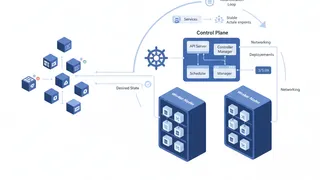 Quiz
QuizKubernetes: Container Orchestration Essentials
Test your knowledge of Kubernetes fundamentals with a quiz covering Pods, Services, Deployments, StatefulSets, storage, networking, RBAC, autoscaling, and container orchestration best practices.
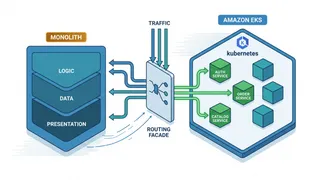 Case study
Migrating a Monolith to Kubernetes Without a Big-Bang Cutover
Using the strangler-fig pattern to move a large monolith onto EKS service by service, with a routing facade, gradual traffic shifting, and a rollback at every step.
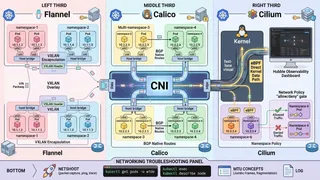 Article
Kubernetes Networking Demystified: CNI Plugins, Network Policies, and Pod-to-Pod Communication
A friendly, technical guide to Kubernetes networking. We cover how CNI plugins like Calico and Cilium work, how to write Network Policies, and how to debug those annoying connectivity issues.
 Dev tip
Docker Is Eating Your Disk Space (And How PruneMate Fixes It)
Your Docker host is slowly filling up with unused images, orphaned volumes, and stale build cache. Manual cleanup feels risky, and you might accidentally delete the wrong thing. Here's how PruneMate automates Docker maintenance across your home lab with scheduled cleanup, remote host support, and a clean interface that shows exactly what you're deleting before you commit.
You might also enjoy
More posts on similar topics
6 related posts