JSON
JSON (JavaScript Object Notation) is a lightweight, text-based data format used for data exchange. It supports objects, arrays, strings, numbers, booleans, and null values, and every mainstream programming language can read it.
JSON (JavaScript Object Notation) is a lightweight, text-based data exchange format. It’s universally supported across programming languages and provides a simple, readable way to structure and transmit data.
Browse the sections below to explore JSON syntax, data types, and practical examples.
No commands found
Try adjusting your search term
Getting Started
Fundamental JSON concepts and syntax for beginners.
Basic Structure
Understanding JSON file structure and format.
Minimal JSON object
The simplest valid JSON structure is an empty object.
{}echo '{}' | jq .{}- JSON must contain valid data structure (object or array at root).
- An empty object {} is a valid JSON document.
Valid JSON structure
A basic JSON object with key-value pairs representing a person.
{ "name": "John", "age": 30, "city": "New York"}echo '{"name":"John","age":30,"city":"New York"}' | jq .{ "name": "John", "age": 30, "city": "New York"}- Keys must be strings enclosed in double quotes.
- Values can be strings, numbers, booleans, null, objects, or arrays.
JSON file format
A typical JSON file structure for configuration data.
{ "version": "1.0", "author": "Admin", "timestamp": "2025-02-28"}cat config.json | jq .{ "version": "1.0", "author": "Admin", "timestamp": "2025-02-28"}- JSON files should be saved with .json extension.
- Files should contain valid JSON starting with { or [.
Data Types
JSON data types and their usage.
All JSON data types
Demonstrates all seven JSON data types.
{ "string": "Hello", "number": 42, "decimal": 3.14, "boolean_true": true, "boolean_false": false, "null_value": null, "array": [1, 2, 3], "object": {"key": "value"}}jq . data.json{ "string": "Hello", "number": 42, "decimal": 3.14, "boolean_true": true, "boolean_false": false, "null_value": null, "array": [1, 2, 3], "object": {"key": "value"}}- JSON has exactly seven data types.
- Booleans are lowercase true and false (not True/False).
Type examples
Real-world example showing mixed data types in a user object.
{ "user": { "id": 123, "active": true, "score": 98.5, "notes": null, "tags": ["admin", "verified"] }}jq '.user' user.json{ "id": 123, "active": true, "score": 98.5, "notes": null, "tags": ["admin", "verified"]}- Use null to represent missing or undefined values.
- Numbers don't need quotes.
Multiple types in array
Arrays can contain any combination of JSON data types.
{ "mixed": [ "string", 42, true, null, {"nested": "object"}, [1, 2, 3] ]}jq '.mixed | length' mixed.json6- Arrays maintain order and can mix different types.
- Be cautious with mixed-type arrays; they are harder to parse.
Whitespace and Comments
Handling whitespace, formatting, and comments in JSON.
Formatted JSON
Pretty-printed JSON with indentation for readability.
{ "name": "Alice", "age": 28, "email": "alice@example.com"}jq . user.json{ "name": "Alice", "age": 28, "email": "alice@example.com"}- Whitespace outside quotes is ignored in JSON.
- Use consistent indentation (typically 2 or 4 spaces).
Minified JSON
Minified JSON removes all unnecessary whitespace for smaller file size.
{"name":"Bob","age":35,"email":"bob@example.com","active":true}jq -c . user.json{"name":"Bob","age":35,"email":"bob@example.com","active":true}- Minified JSON is harder to read but smaller for transmission.
- Both formatted and minified are equivalent.
Pretty-printed with indentation
JSON with 4-space indentation standard.
{ "user": { "id": 1, "details": { "name": "Carol", "role": "admin" } }}jq . --indent 4 config.json4-space indentation applied- Most style guides recommend 2-4 spaces for indentation.
- Line breaks can appear within strings using escape sequences.
Objects
Working with JSON objects and key-value pairs.
Object Syntax
Understanding JSON object structure and syntax.
Empty object
An empty object contains no key-value pairs.
{}echo '{}' | jq 'type'"object"- Empty objects are valid and often used as defaults.
- Objects use curly braces {} as delimiters.
Simple object
A simple object with three key-value pairs.
{ "firstName": "John", "lastName": "Doe", "age": 30}jq . person.json{ "firstName": "John", "lastName": "Doe", "age": 30}- Each key is a string in double quotes.
- Key-value pairs are separated by colons.
- Pairs are separated by commas.
Nested object
Objects can be nested within other objects.
{ "person": { "name": "Jane", "contact": { "email": "jane@example.com", "phone": "555-1234" } }}jq '.person.contact' person.json{ "email": "jane@example.com", "phone": "555-1234"}- Objects can contain other objects as values.
- Nesting can go multiple levels deep.
Object Keys
Understanding JSON object key naming and conventions.
Simple key names
Standard key names that follow common conventions.
{ "id": 1, "name": "Alice", "email": "alice@example.com", "verified": true}jq 'keys' user.json[ "email", "id", "name", "verified"]- Use camelCase or snake_case consistently.
- Keep key names short and descriptive.
Keys with spaces
Keys can contain spaces if enclosed in double quotes.
{ "first name": "John", "last name": "Smith", "home address": "123 Main St"}jq '["first name"]' person.json"John"- Keys with spaces are valid but harder to access programmatically.
- Use underscores or camelCase instead of spaces.
Keys with special characters
Keys can contain special characters but must be quoted.
{ "@id": "obj-123", "$type": "Person", "api-key": "abc123xyz", "time&date": "2025-02-28"}jq '.["@id"]' metadata.json"obj-123"- Special characters require bracket notation to access.
- Avoid special characters in keys when possible.
Object Values
Understanding JSON object values and nesting.
Different value types
Objects can contain any valid JSON value.
{ "stringValue": "text", "numberValue": 42, "decimalValue": 3.14, "booleanValue": true, "nullValue": null, "arrayValue": [1, 2, 3], "objectValue": {"nested": true}}jq '.stringValue' data.json"text"- Values can be of any JSON type.
- Use appropriate types for each value.
Nested objects as values
Objects can be deeply nested within each other.
{ "user": { "profile": { "name": "Bob", "age": 35 }, "settings": { "notifications": true, "theme": "dark" } }}jq '.user.settings' user.json{ "notifications": true, "theme": "dark"}- Nesting allows hierarchical data representation.
- Access nested values using dot notation.
Array values in objects
Objects can contain arrays as values.
{ "user": "Carol", "hobbies": ["reading", "gaming", "cooking"], "scores": [95, 87, 92, 88], "contacts": [ {"type": "email", "value": "carol@example.com"}, {"type": "phone", "value": "555-5678"} ]}jq '.hobbies[0]' user.json"reading"- Arrays can be homogeneous (same type) or heterogeneous (mixed types).
- Access array elements by index notation.
Arrays
Working with JSON arrays and list structures.
Array Syntax
Understanding JSON array structure and syntax.
Empty array
An empty array contains no elements.
[]echo '[]' | jq 'type'"array"- Empty arrays are valid and used as defaults.
- Arrays use square brackets [] as delimiters.
Simple array
A simple array of strings.
[ "apple", "banana", "cherry"]jq . fruits.json[ "apple", "banana", "cherry"]- Array elements are separated by commas.
- No trailing comma after last element.
Mixed types array
Arrays can contain heterogeneous types.
[ "string", 42, true, null, {"key": "value"}, [1, 2, 3]]jq 'length' mixed.json6- Mixed-type arrays are valid but harder to parse.
- Prefer homogeneous arrays when possible.
Array Elements
Understanding JSON array element types and access.
Array of objects
Array containing objects.
[ { "id": 1, "name": "Alice", "role": "admin" }, { "id": 2, "name": "Bob", "role": "user" }]jq '.[0].name' users.json"Alice"- Access elements by index and key: array[0].key.
- Perfect for representing collections of entities.
Nested arrays
Array of arrays (2D matrix structure).
[ [1, 2, 3], [4, 5, 6], [7, 8, 9]]jq '.[1][2]' matrix.json6- Access nested arrays: array[row][column].
- Useful for matrix or grid data.
Homogeneous array
Arrays with all elements of same type.
{ "scores": [95, 87, 92, 88, 91], "temperatures": [72.5, 68.3, 75.1, 69.8]}jq '.scores | length' data.json5- Homogeneous arrays are easier to process.
- All elements should have consistent meaning.
Array Operations
Common operations with JSON arrays.
Accessing array elements
Access array element by zero-based index.
{ "colors": [ "red", "green", "blue", "yellow" ]}jq '.colors[2]' colors.json"blue"- Index 0 is the first element.
- Negative indices work in some languages.
Array length
Get the number of elements in an array.
{ "items": ["apple", "banana", "cherry", "date"]}jq '.items | length' items.json4- Length is commonly needed for iteration.
- Empty array has length 0.
Slicing arrays
Extract subset of array elements.
{ "numbers": [10, 20, 30, 40, 50, 60]}jq '.numbers[2:5]' numbers.json[ 30, 40, 50]- Slice notation: array[start:end].
- End index is exclusive.
Strings and Numbers
Working with JSON strings and numeric values.
String Format
Understanding JSON string format and syntax.
Simple strings
Basic string values enclosed in double quotes.
{ "greeting": "Hello", "sentence": "This is a complete sentence.", "empty": ""}jq '.greeting' strings.json"Hello"- Strings must use double quotes, not single quotes.
- Empty strings are valid values.
Escaped characters
Strings with escape sequences for special characters.
{ "newline": "Line 1\nLine 2", "tab": "Column 1\tColumn 2", "quote": "She said \"Hello\"", "backslash": "C:\\Users\\Name"}jq '.newline' strings.json"Line 1Line 2"- Escape sequences start with backslash.
- Common escapes: \n (newline), \t (tab), \" (quote).
Unicode strings
Strings can contain Unicode characters and emojis.
{ "emoji": "Hello 👋", "chinese": "你好", "unicode": "A\u0301"}jq '.emoji' unicode.json"Hello 👋"- JSON supports full Unicode character set.
- Unicode escape: \uXXXX where XXXX is hex code.
String Escapes
Understanding JSON escape sequences.
Common escape sequences
Common escape sequences in JSON strings.
{ "quote": "He said \"Hello\"", "backslash": "Path: C:\\Users\\", "newline": "First\nSecond", "tab": "Col1\tCol2", "carriage_return": "Line1\rLine2"}jq '.quote' escapes.json"He said \"Hello\""- \" escapes double quote character.
- \\ escapes backslash itself.
- \n for newline, \t for tab.
All escape sequences
All eight JSON escape sequences.
{ "quote": "\"", "backslash": "\\", "forward_slash": "/", "backspace": "\b", "form_feed": "\f", "newline": "\n", "carriage_return": "\r", "tab": "\t"}jq 'keys' escapes.json[ "backslash", "backspace", "carriage_return", "form_feed", "forward_slash", "newline", "quote", "tab"]- \/ is optional (usually not needed).
- \b and \f are rarely used in practice.
Unicode escape sequences
Unicode escape sequences using \uXXXX notation.
{ "copyright": "\u00A9 2025", "greek": "\u03B1 (alpha)", "emoji_unicode": "\uD83D\uDC4B"}jq '.copyright' unicode.json"© 2025"- Unicode specified as 4 hex digits after \u.
- Useful for non-ASCII characters.
Number Format
Understanding JSON number formatting.
Integer numbers
Integer values without decimal points.
{ "year": 2025, "count": 42, "negative": -100, "zero": 0, "large": 1000000}jq '.year' numbers.json2025- Integers are whole numbers.
- Can be positive, negative, or zero.
Decimal numbers
Decimal (floating-point) numbers.
{ "pi": 3.14159, "price": 19.99, "temperature": -5.5, "percentage": 0.95}jq '.pi' decimals.json3.14159- Include decimal point and digits after it.
- Precision may vary by language.
Scientific notation
Numbers in scientific notation.
{ "avogadro": 6.02214076e+23, "tiny": 1.6e-19, "standard": 1.5e2}jq '.avogadro' scientific.json6.02214076e+23- Use e or E for exponent notation.
- Useful for very large or very small numbers.
Complex Structures
Building complex JSON data structures.
Nested Objects
Working with objects nested within other objects.
Two-level nesting
Basic nested object structure.
{ "person": { "name": "Alice", "age": 30 }}jq '.person.name' user.json"Alice"- Access nested values with dot notation.
- Each level is another object.
Multi-level nesting
Deep nesting of multiple object levels.
{ "company": { "department": { "team": { "lead": "Bob", "size": 5 } } }}jq '.company.department.team.lead' org.json"Bob"- Keep nesting depth reasonable (3-4 levels typical).
- Deep nesting becomes harder to navigate.
Complex hierarchy
Complex hierarchical configuration structure.
{ "application": { "name": "MyApp", "version": "1.0", "config": { "database": { "host": "localhost", "port": 5432, "credentials": { "user": "admin", "password": "secret" } } } }}jq '.application.config.database.host' config.json"localhost"- Used for application configuration.
- Represents real-world nested data.
Nested Arrays
Working with arrays nested within other structures.
Array of arrays
Two-dimensional array structure.
{ "matrix": [ [1, 2, 3], [4, 5, 6], [7, 8, 9] ]}jq '.matrix[1][2]' matrix.json6- Access with double bracket notation.
- Row column indices like [1][2].
Array of objects
Common structure for collections of entities.
{ "users": [ { "id": 1, "name": "Alice", "email": "alice@example.com" }, { "id": 2, "name": "Bob", "email": "bob@example.com" } ]}jq '.users[0].email' users.json"alice@example.com"- Perfect for API responses with multiple items.
- Each object is a separate item.
Complex nesting
Complex nested array and object combination.
{ "departments": [ { "name": "Engineering", "members": [ {"name": "Alice", "roles": ["dev", "lead"]}, {"name": "Bob", "roles": ["dev", "devops"]} ] }, { "name": "Sales", "members": [ {"name": "Carol", "roles": ["sales"]} ] } ]}jq '.departments[0].members[1].roles[0]' org.json"dev"- Represents real-world hierarchical data.
- Access with combined notation.
Mixed Structures
Combining objects and arrays in real-world structures.
API response structure
Typical API response with status and nested data.
{ "status": "success", "data": { "items": [ { "id": 1, "title": "Item 1", "price": 29.99 }, { "id": 2, "title": "Item 2", "price": 39.99 } ], "pagination": { "page": 1, "total": 50 } }}jq '.data.items[0].title' response.json"Item 1"- Common pattern in REST APIs.
- Combines object and array nesting.
Configuration structure
Configuration combining objects and array of objects.
{ "server": { "host": "localhost", "port": 3000, "endpoints": [ { "path": "/api/users", "method": "GET" }, { "path": "/api/users", "method": "POST" } ] }}jq '.server.endpoints[1].path' config.json"/api/users"- Used for application configuration.
- Organizes settings hierarchically.
Data model structure
A full data model with mixed nesting.
{ "user": { "id": 123, "profile": { "firstName": "John", "lastName": "Doe", "avatar": "https://example.com/avatar.jpg" }, "subscriptions": [ { "plan": "premium", "renewalDate": "2025-03-28" } ], "preferences": { "notifications": true, "themes": ["dark", "light"] } }}jq '.user.preferences.themes[0]' user.json"dark"- Represents complete user profile.
- Combines all structure types.
Validation and Best Practices
Validating and properly formatting JSON data.
Valid JSON
Valid JSON structure and common mistakes.
Valid JSON structure
Properly formatted, valid JSON structure.
{ "name": "John", "age": 30, "email": "john@example.com", "active": true, "roles": ["admin", "user"], "metadata": null}jq . valid.jsonValid JSON (output shown)- All keys are quoted strings.
- All values are valid JSON types.
- No trailing commas.
Invalid structure examples
Common mistakes that make JSON invalid.
{ name: "John", age: 30, active: true, roles: ["admin", "user",]}jq . invalid.json 2>&1parse error: Invalid JSON- Keys must be quoted (single or double).
- Trailing commas are not allowed.
- Values like true/false must be unquoted.
Common JSON errors
Multiple common JSON validation errors.
{ "valid_key": "value", 'invalid_key': "value", "no_comma" "next_key", "trailing": "comma",}echo 'Show validation errors'Multiple errors detected- Single quotes not allowed for keys or strings.
- Missing commas between pairs.
- Trailing comma after last element.
Formatting and Style
JSON formatting, indentation, and style conventions.
Pretty-printed JSON
Well-formatted JSON with 2-space indentation.
{ "user": { "id": 1, "name": "Alice", "tags": ["admin", "verified"], "active": true }}jq . user.json{ "user": { "id": 1, "name": "Alice", "tags": [ "admin", "verified" ], "active": true }}- Improves readability and debugging.
- Standard in development.
- 2-4 spaces recommended for indentation.
Minified JSON
Minified JSON with no whitespace.
{"user":{"id":1,"name":"Alice","tags":["admin","verified"],"active":true}}jq -c . user.json{"user":{"id":1,"name":"Alice","tags":["admin","verified"],"active":true}}- Reduces file size for transmission.
- Standard for production/APIs.
- Harder to read manually.
Indentation standards
JSON with 4-space indentation standard.
{ "level": 1, "nested": { "level": 2, "items": [ "first", "second" ] }}jq --indent 4 . file.json4-space indentation- Some organizations prefer 4 spaces over 2.
- Consistency important within project.
Parsing and Use
Parsing JSON and using it in applications.
JavaScript JSON parsing
Parsing JSON string to JavaScript object.
{ "name": "John", "age": 30, "email": "john@example.com"}node -e "const data = JSON.parse('{\"name\": \"John\"}'); console.log(data.name);"John- JSON.parse() converts string to object.
- JSON.stringify() converts object to string.
Python JSON parsing
Parsing JSON string to Python dictionary.
{ "product": "Laptop", "price": 999.99, "available": true}python3 -c "import json; data = json.loads('{\"product\": \"Laptop\"}'); print(data['product'])"Laptop- json.loads() parses JSON string.
- json.load() reads from file.
Validation with schema
JSON Schema for validating data structure.
{ "type": "object", "properties": { "name": {"type": "string"}, "age": {"type": "integer"}, "email": {"type": "string"} }, "required": ["name", "email"]}echo 'JSON Schema validation'Schema validates structure- Schema defines expected structure.
- Tools validate data against schema.
Was this useful?
Continue on this topic
The same subject, covered a different way from the cheatsheet above.
 Article
AWS CloudFormation for Infrastructure as Code (IaC)
AWS CloudFormation lets you declare your infrastructure as JSON or YAML templates, so you can create, update, and manage AWS resources consistently through code instead of manual console clicks. This post covers templates, stacks, change sets, rollbacks, and best practices for using CloudFormation as part of an infrastructure as code workflow.
 Code snippet
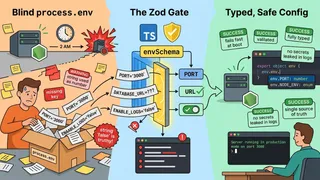
Node.js Environment Variable Validation with Zod at Startup
Stop trusting process.env blindly. This Node.js and TypeScript snippet validates every environment variable at startup with a Zod schema, coerces strings into real types, and refuses to boot on bad config so you catch mistakes before a single request is served.
 Article
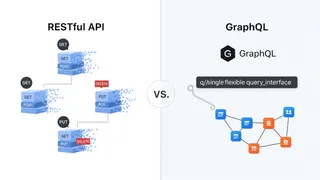
RESTful API vs. GraphQL: Which API is the Right Choice for Your Project?
How RESTful and GraphQL APIs compare for a real-time data application, and how to decide between the tried-and-true REST approach and the more flexible GraphQL approach for your project.
 Article
Scaling Up, Staying Strong: Hands-On AWS CloudFormation Techniques for Building Resilient and Scalable Systems
Building resilient and scalable systems matters for businesses that need to meet growing demand and maintain high availability. This article covers how AWS CloudFormation, an infrastructure as code tool, helps you build resilient and scalable systems with a hands-on approach.
You might also enjoy
More posts on similar topics
5 related posts