Why container security matters
Where the vulnerabilities hide
A container image is one of the largest pieces of untrusted code you ship.
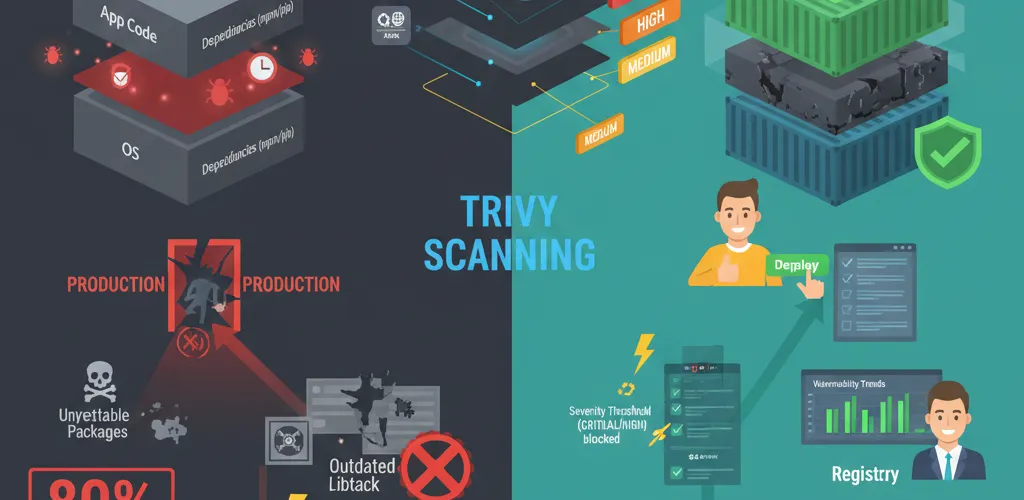
Every image you build carries the base OS layer, runtime libraries, your dependencies and your application code. Any of those layers can hold known CVEs, and most of them you didn’t write. Without scanning, that whole stack reaches production unread.
The numbers
- 80% of container images in production contain at least one known vulnerability
- Supply chain attacks targeting container registries are increasing
- Unpatched container vulnerabilities lead to data breaches and service disruptions
The challenge
Why manual review isn’t enough
Nobody is going to read the dependency tree of every image on every build. Without automation, a vulnerable image ships, and you find out about it from a CVE feed or an incident rather than from the pipeline that built it.
Common vulnerabilities in containers
- Outdated base images with unpatched OS vulnerabilities
- Vulnerable dependencies pulled in from npm, pip or Maven
- Exposed secrets accidentally included in image layers
- Misconfigurations creating insecure defaults
- Malware hidden in supply chain attacks
The fix: Trivy
What Trivy is
Trivy is a fast container vulnerability scanner from Aqua Security. It scans container images, filesystems and configuration files for known vulnerabilities, misconfigurations and secrets.
Why I reach for Trivy
- Speed: Scans images in seconds, not minutes
- Accuracy: Supports multiple vulnerability databases (NVD, GitHub Security, Aqua, Alpine)
- Broad coverage: Detects OS vulnerabilities, application dependencies, and misconfigurations
- Zero setup: Works out of the box without complex configuration
- CI/CD ready: Integrates easily into GitHub Actions, GitLab CI, Jenkins
- Open-source: Free, transparent, and community-driven
Installation and setup
Installing Trivy
# macOSbrew install trivy
# Linux (Ubuntu/Debian)wget -qO - https://aquasecurity.github.io/trivy-repo/deb/public.key | apt-key add -echo "deb https://aquasecurity.github.io/trivy-repo/deb $(lsb_release -sc) main" | tee -a /etc/apt/sources.list.d/trivy.listapt-get updateapt-get install trivy
# Dockerdocker pull aquasec/trivy
Basic image scanning
# Scan a local imagetrivy image my-app:latest
# Scan from registrytrivy image nginx:latest
# Scan with detailed outputtrivy image --severity HIGH,CRITICAL my-app:latest
Setting severity thresholds
Scanning at specific severity levels
# Only show critical and high severity issuestrivy image --severity CRITICAL,HIGH my-app:latest
# Exit with error code if vulnerabilities foundtrivy image --severity HIGH,CRITICAL --exit-code 1 my-app:latest
Output formats
# JSON output for parsingtrivy image --format json my-app:latest
# SARIF format for GitHub integrationtrivy image --format sarif my-app:latest
# Table format (default)trivy image --format table my-app:latest
CI/CD integration
GitHub Actions workflow
name: Container Vulnerability Scan
on: push: branches: [main] paths: - 'Dockerfile' - 'src/**' pull_request: branches: [main]
jobs: trivy-scan: runs-on: ubuntu-latest steps: - uses: actions/checkout@v3
- name: Set up Docker Buildx uses: docker/setup-buildx-action@v2
- name: Build Docker image uses: docker/build-push-action@v4 with: context: . file: ./Dockerfile push: false load: true tags: my-app:${{ github.sha }}
- name: Run Trivy vulnerability scan uses: aquasecurity/trivy-action@master with: image-ref: my-app:${{ github.sha }} format: 'sarif' output: 'trivy-results.sarif' severity: 'CRITICAL,HIGH'
- name: Upload Trivy results to GitHub Security uses: github/codeql-action/upload-sarif@v2 with: sarif_file: 'trivy-results.sarif'
- name: Fail if critical vulnerabilities found run: | trivy image --severity CRITICAL my-app:${{ github.sha }} --exit-code 1GitLab CI
stages: - build - scan
build: stage: build image: docker:latest services: - docker:dind script: - docker build -t $CI_REGISTRY_IMAGE:$CI_COMMIT_SHA . - docker push $CI_REGISTRY_IMAGE:$CI_COMMIT_SHA
scan: stage: scan image: aquasec/trivy:latest script: - trivy image --severity HIGH,CRITICAL --exit-code 1 $CI_REGISTRY_IMAGE:$CI_COMMIT_SHA allow_failure: falsePolicy enforcement
Creating a Trivy policy
# Define what constitutes a vulnerability violationseverity: HIGH,CRITICAL
# Ignore specific CVEs for known/accepted risksignorefile: .trivyignore
# Policy for failing buildsexit-code: 1
# Require sign-off for medium severitymedium-requires-approval: trueIgnoring false positives
# Format: CVE-XXXX-XXXXX [optional: expiration date]
# Known false positive or acceptable risk (expires 2026-12-31)CVE-2024-1234 2026-12-31
# Permanently ignore (use with caution)CVE-2024-5678
Beyond images
Scanning filesystems
# Scan local directorytrivy fs .
# Scan with detailed outputtrivy fs --severity HIGH,CRITICAL --format json . > fs-scan.json
Scanning configuration files
# Detect misconfigurations in Dockerfiletrivy config Dockerfile
# Scan Kubernetes manifeststrivy config k8s-manifests/
Generating a Software Bill of Materials (SBOM)
# Generate SBOM in CycloneDX formattrivy image --format cyclonedx my-app:latest > sbom.xml
# Generate SBOM in SPDX formattrivy image --format spdx my-app:latest > sbom.spdx
Remediation
When vulnerabilities are found
- Smallest change: update the base image
# BeforeFROM ubuntu:20.04
# AfterFROM ubuntu:22.04- Targeted change: update the vulnerable dependency
FROM node:18-alpine
# Install with security patchesRUN npm install --no-save my-package@latest- Last resort: rebuild the image without cache
docker build --no-cache -t my-app:latest .A scheduled scan across every image
name: Production Container Security
on: schedule: # Run daily scans - cron: '0 2 * * *' workflow_dispatch:
jobs: scan-all-images: runs-on: ubuntu-latest strategy: matrix: image: - my-app:latest - api-gateway:latest - worker-service:latest
steps: - uses: aquasecurity/trivy-action@master with: image-ref: ${{ matrix.image }} format: 'json' output: 'trivy-${{ matrix.image }}.json' severity: 'CRITICAL,HIGH,MEDIUM'
- name: Archive results uses: actions/upload-artifact@v3 with: name: trivy-reports path: trivy-*.json
- name: Notify security team if: failure() run: | curl -X POST -H 'Content-type: application/json' \ --data '{"text":"Critical vulnerabilities found in ${{ matrix.image }}"}' \ ${{ secrets.SLACK_WEBHOOK_URL }}Monitoring and reporting
Storing results over time
# Generate timestamped reportsTIMESTAMP=$(date +%Y%m%d-%H%M%S)trivy image --format json my-app:latest > reports/scan-$TIMESTAMP.jsonTracking vulnerability trends
#!/bin/bash# Count vulnerabilities by severitytrivy image --format json my-app:latest | \ jq '[.Results[]?.Vulnerabilities[]?.Severity] | group_by(.) | map({severity: .[0], count: length})'Best practices
1. Scan early and often
- Scan during development (local images)
- Scan in CI/CD pipeline (before merge)
- Scan in registry (continuous monitoring)
- Scan in production (runtime detection)
2. Use minimal base images
# Reduce attack surfaceFROM alpine:3.18 as baseFROM gcr.io/distroless/base-debian113. Update dependencies regularly
# Update dependencies regularlynpm audit fix --forcepython -m pip install --upgrade pip4. Keep SBOMs
Generate and store SBOMs for supply chain transparency:
trivy image --format cyclonedx my-app:latest > sbom.jsongit add sbom.jsongit commit -m "Update SBOM for security tracking"Registry integration
Push only images that passed
# Only push if scan passestrivy image --severity CRITICAL,HIGH --exit-code 1 my-app:latest && \ docker push my-registry/my-app:latestWrapping up
If you ship containers, something has to scan them before the registry does.
Trivy is the cheapest way I know to do that. Add it to the pipeline, pick the severity you’ll fail the build on, and treat the .trivyignore file as something that gets reviewed rather than something that grows. Start at CRITICAL if HIGH would block every build on day one, then tighten it once the base images are current.