Ever get super frustrated with your CI/CD pipeline? You know, the one that sometimes works perfectly and other times just throws a random tantrum? You push your code, the pipeline starts doing its thing, and you’re crossing your fingers for that sweet green light. But then a failure pops up out of nowhere, and you’re stuck spending hours trying to figure out why, only for it to maybe disappear on the next try. If that sounds familiar, you’re not alone. These unreliable, on-again-off-again pipelines are what we call “flaky.” And honestly, they can really mess with how productive you are, make you doubt your tests, and just slow everything down. So, how do we get a grip on this mess and build CI/CD pipelines we can actually count on?
What’s the deal with “flaky” CI/CD pipelines anyway?
Often, when a CI/CD pipeline’s acting flaky, it boils down to something called a flaky test. These are tests that just can’t make up their mind. They’ll pass one time and then fail the next, even if you haven’t touched the code or the test itself. There are a bunch of reasons why this happens. Maybe the environment’s a bit off, or the test data isn’t getting refreshed properly between runs. Sometimes it’s about timing or even the time zone, and other times it’s because the tests depend on each other in a weird way.
When these flaky tests sneak into your automated CI/CD pipeline, that’s when you get a flaky pipeline. The whole thing might fail now and then, not because there’s a real problem with your code, but just because these tests are so unpredictable, or something else in the pipeline is acting up. It can be a real pain, causing builds to fail for no good reason and holding up your software releases. The big issue with flakiness is that you just can’t predict it. It makes it super hard to tell if a pipeline failure means you’ve actually got a bug in your software or if it’s just a temporary hiccup.
Why bother fixing flaky pipelines? Trust me, it’s worth it
Ignoring flaky pipelines can really bite you in the long run, messing with your development process and the quality of your software. One of the first things you’ll notice is that development and releases start taking longer. When pipelines fail sometimes, developers often have to run them over and over to make sure the failure’s real, which wastes a lot of time and delays getting new stuff or bug fixes out the door.
Plus, flaky pipelines seriously damage the trust you have in your test results and the whole CI/CD thing. If tests keep failing for reasons that have nothing to do with your code, the team might start to think the automated tests aren’t reliable. This can lead to a lot of extra debugging as developers chase down errors that are random and hard to recreate. Sometimes, all the noise from flaky failures can even hide real problems, letting actual bugs slip into production. And all that time spent looking into these false alarms? That adds up in maintenance costs too. Ultimately, if you’ve got flaky pipelines, it makes it really tough to achieve true continuous deployment, where you’re releasing software frequently and reliably. It’s hard to fully automate the deployment process when you don’t trust the pipeline’s stability.
The usual suspects: what commonly causes flaky behavior in CI/CD?
Figuring out what usually causes flakiness is the first step in being able to troubleshoot and stop it from happening. One common culprit is concurrency issues. When tests run at the same time, they might fight over the same resources, leading to race conditions or deadlocks that cause things to go wrong in unpredictable ways.
Another big reason for flakiness is external dependencies. If your tests rely on outside systems like APIs, databases, or network services, they can fail now and then because of network delays, downtime, or just different response times from these services. Timing and synchronization problems are also pretty common. Tests might fail if they don’t wait long enough for things to finish happening in the background, or if they expect things to take a specific amount of time that isn’t always guaranteed. Timeouts, while they’re needed, can also cause flakiness if they’re set too short for certain situations.
Non-deterministic logic in your tests or the application code can also lead to inconsistent results. If you’re relying on random stuff like dates, times, or user input without controlling it properly, your tests might pass or fail without any real reason. Plus, an unstable test environment is a major source of flakiness. If tests aren’t properly isolated from each other, if configurations are different across runs, or if you’re running into resource limits like not enough memory or CPU, that can all lead to intermittent failures. If one test leaves behind some state that affects the next one, that can also cause unexpected behavior. Finally, test order dependency, where whether a test passes depends on which tests ran before it, is another common cause of flakiness. Poorly written tests with too few checks or wrong assumptions add to the problem too.
Detective mode: how do you actually find flaky tests in your CI/CD pipeline?
Finding flaky tests takes a careful approach and often means using the tools your CI/CD system gives you. One basic thing to do is look at your past test results. By checking the logs from previous pipeline runs, you can look for tests that have a pattern of passing and failing without any changes to the code. A lot of CI/CD tools even have built-in features to detect flaky tests that can automatically flag tests that act inconsistently based on their history.
Another good way is to run tests multiple times under the exact same conditions. If a test passes sometimes and fails other times without any changes, that’s a pretty clear sign it’s flaky. Keeping track of and writing down the history of your test runs, including how often they fail and in what patterns, can also help you spot the unreliable ones. When you think a specific test might be flaky, try running it by itself multiple times to see if the flakiness is really in that test or if something else is influencing it. Lastly, using test retrying plugins and frameworks can help you find them. If a test fails the first time but then passes on an automatic retry, it’s likely flaky. There are also special tools out there designed to analyze test patterns and find flakiness, and they can be really helpful.
Uh oh, it failed. Now what? A practical guide to troubleshooting flaky pipelines
When your CI/CD pipeline fails and you think it’s because of a flaky test, you need a plan for figuring out what’s going on. First, take a look at the logs and outputs from the failed pipeline run. Check the error messages, stack traces, and anything else that might give you a hint about why it failed. Sometimes, making your pipeline logging more detailed can reveal more about what went wrong.
Next, try to isolate the test that failed and run it on its own, both on your computer and in the CI environment if you can. The goal here is to make the failure happen on your own machine. Tools like Docker or act can be super useful for recreating the CI environment on your local machine, including all the specific things it depends on and how it’s set up. Carefully compare the differences between your local setup and the CI/CD environment. Make sure all the dependency versions are the same in both places. Also, check your CI/CD configuration files for any mistakes or incorrect settings that might be causing the flakiness.
Using the debugging tools that your CI/CD platform or testing framework provides can be really helpful. Some platforms even let you SSH into the CI runner to look around and debug things directly. Finally, pay close attention to any potential timing and concurrency issues. Look for race conditions or synchronization problems in your code or tests, especially if the failures seem to happen more often when things are busy or running in parallel.
Prevention is better than cure: keeping flakiness out of your CI/CD setup
The best way to deal with flaky pipelines is to stop them from happening in the first place. This starts with writing tests that you can trust. Make your tests small, focused, and predictable, and don’t use any logic that’s not deterministic. Keeping test environments isolated matters just as much. Use containerization (like Docker), virtualization, or temporary environments to make sure each test runs in a clean and consistent state without affecting other tests.
Carefully manage external dependencies by using mocks, stubs, or fakes to pretend to be the external services. This makes your tests less dependent on whether those services are available and stable. When you’re dealing with asynchronous operations, use proper ways to wait and synchronize things, like explicit waits and timeouts, instead of just guessing how long to wait. Be careful about test order and don’t create tests that rely on what happened in previous tests. You might even want to try running your tests in a random order to see if you uncover any hidden dependencies. Use consistent test data so you don’t get different results each time. Finally, make sure you regularly maintain your tests by reviewing them, cleaning them up, and getting rid of any that are no longer needed. Treat your test code with the same care you give your application code, and make sure it goes through code reviews too.
When things get tricky: retry mechanisms for random failures
Even if you do everything right, sometimes you’ll still get tests that fail now and then for no clear reason. In these cases, retry mechanisms can be helpful. A lot of CI/CD tools and testing frameworks let you automatically retry failed tests. You can often set it up to only retry based on certain types of errors, like network issues, and you can limit how many times it retries to avoid getting stuck in a loop.
But remember, retries should be a temporary fix while you figure out why the test is flaky, not a permanent solution. Relying too much on retries can hide real problems and make your system less stable in the long run. It’s important to know the difference between a real failure and a flaky one, and only retry tests that you suspect are flaky. Tools like TestNG’s IRetryAnalyzer and Jest’s retry configuration give you ways to implement retry logic in your tests.
Keep an eye on things: why logging and monitoring pipeline health matters
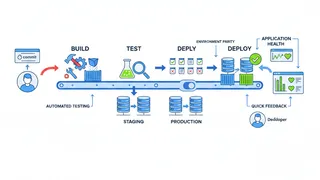
Logging and monitoring your CI/CD pipeline are super important for finding and fixing flaky tests and other problems early on. Make sure you’re logging everything important in your pipeline, like each step, the test results, and any relevant info about the environment. Keep an eye on key metrics like how long builds take, how often tests pass, and how frequently you’re deploying. This helps you spot trends and anything unusual. Set up alerts to let your team know if something fails or if there’s any weird behavior in the pipeline.
Use dashboards to see the health of your pipeline at a glance and make it easier to find patterns or recurring issues. Look at your logs to understand why things are failing. You might even want to use AI-powered tools that can help you analyze a lot of log data and find the root causes of pipeline failures more quickly. If you’re monitoring things proactively, you can catch flaky tests early, before they cause big problems for your development process. Tools like Datadog and Grafana offer good ways to monitor and get alerts for your CI/CD pipelines.
A real-world example: debugging flaky pipelines with GitHub Actions and act
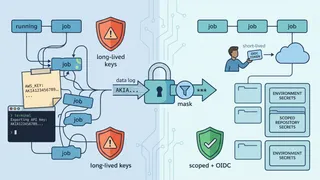
Let’s see how you might troubleshoot flaky pipelines if you’re using GitHub Actions. If you think a workflow is failing sometimes for no reason, the first thing to do is usually turn on debug logging. You can do this by setting the secret ACTIONS_RUNNER_DEBUG or the variable ACTIONS_STEP_DEBUG to true in your repository settings. This will give you more detailed logs during your workflow runs, which can help you understand what’s happening and where things might be going wrong.
To make debugging faster, you can use act, a tool you can run from your command line that lets you run your GitHub Actions workflows on your own computer. After you install act, you can go to your repository in your terminal and run the command act. This will pretend to be a GitHub Actions run on your local machine, using Docker containers to run the workflow steps. This way, you can try to recreate the failing workflow locally without having to push code changes over and over. You can look at the logs that act generates to see where it’s failing. You can also set environment variables and secrets using the -s flag or a .env file to make your local environment more like your GitHub Actions environment.
For more direct debugging in GitHub Actions, you can use actions like mxschmitt/action-tmate. This action lets you create a secure SSH connection to the runner environment where your workflow is running, so you can look at files, run commands, and debug things in real-time.
Frequently Asked Questions
Flaky tests often happen because of concurrency issues, relying on external stuff that’s not always stable, timing and synchronization problems, logic that’s not predictable, test environments that aren’t stable, and tests that depend on the order they run in.
GitLab CI/CD has features to help you spot flaky tests. You can look at the pipeline success and duration charts to find jobs that fail randomly. GitLab also lets you set up automatic retries for tests that fail, and if a test passes on a retry, it can be marked as potentially flaky. Plus, you can use the CI Lint tool to check your pipeline configuration for any potential issues. For more advanced tracking, you might want to connect with tools that offer specific flaky test detection and reporting within GitLab.
A good way is to use mocks, stubs, or fakes to simulate how external things like APIs or databases behave. This keeps your tests from relying on whether those external systems are working. You can also use dependency injection to easily swap out the real dependencies with test doubles. For integration tests where you do need to talk to real external systems, think about using dedicated test accounts or controlled datasets to minimize interference.
Use containerization technologies like Docker to create isolated and consistent test environments for each pipeline run. Make sure your tests don’t depend on shared states and that you’re setting up and cleaning up anything needed within each test’s scope. If you’re working with databases, consider using database transaction rollbacks or dedicated cleanup jobs to make sure you start with a clean slate before each test.
While retrying flaky tests might make your CI/CD pipeline seem more stable for a bit, it’s not a good long-term fix. Retries just hide the real problems causing the flakiness and can give you a false sense of security. It’s important to find out why the tests are flaky and fix them properly. Retries should only be used carefully as a short-term solution while you’re working on the underlying issues.
Conclusion
Flaky CI/CD pipelines can really get in the way of delivering software efficiently and reliably. But by understanding what causes this flakiness, using good ways to find and fix it, and following best practices to prevent it, you can make your pipelines much more stable. Be proactive about test reliability and the health of your CI/CD pipeline. Tools like GitHub Actions and act are great for building and debugging your pipelines, but what actually gets things under control is writing solid, isolated tests and keeping your CI/CD environment monitored and consistent. When the pipeline is stable, a red build means something, and you can release on its word.
References
- What are Flaky Tests? | TeamCity CI/CD Guide - JetBrains
- Manage flaky tests - Azure Pipelines | Microsoft Learn
- A Deep Dive Into Flaky Tests - DevOps.com
- How to Identify, Fix, and Prevent Flaky Tests - TestRail
- Understanding flaky tests and how to deal with them - Buildkite
- How to reduce flaky test failures - CircleCI
- Handling Flaky Tests: Reducing the Noise in CI/CD Pipeline - Launchable Inc.
- How to Reproduce CI Failures Locally in Playwright - DEV Community
- Debug your GitHub Actions by using tmate
- Running GitHub Actions Locally with act - A Comprehensive Guide - Codemancers
- Best Practices for Identifying and Mitigating Flaky Tests - Semaphore
- Best practices for monitoring software testing in CI/CD - Datadog
- CI/CD Pipeline Best Practices | Blog - Digital.ai
- Monitoring workflows - GitHub Docs
- How to test GitHub Actions locally? - BrowserStack