On December 17, 2025, the world of container security changed in a big way. Docker decided to open up its entire catalog of over 1,000 Docker Hardened Images (DHI) to everyone under the Apache 2.0 license. This isn’t just a small update. It’s a move away from the old “pay-to-play” security model where only big companies with deep pockets could afford the best protection. Now, whether you’re a hobbyist working on a weekend project or a dev at a massive agency, you’ve got access to the same high-tier security. With supply chain attacks expected to cost businesses around $60 billion this year, this shift is more than welcome. Here is what it means for you and your DevSecOps workflow.
What sparked this massive change in how Docker handles security?
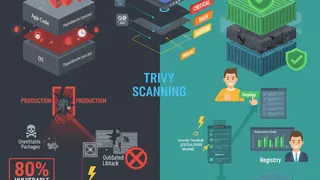
For a long time, the industry has been stuck in what people call the “Supply Chain Paradox.” We all use open source because it’s fast and capable, but keeping it secure is a nightmare. Most devs pull a community image, run a scan, and then get hit with a wall of red alerts. You’d spend your whole afternoon trying to patch vulnerabilities you didn’t even know were there. Historically, the “clean” base images, the ones that were already patched and minimal, were locked behind expensive enterprise walls.
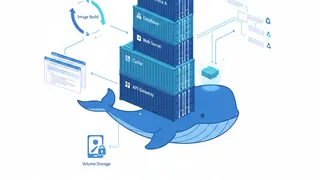
Docker realized that container images are the perfect place to fix this. They’re the delivery trucks for your code. By making these images free and open source, Docker is making it so that the “right way” to do things is also the “easy way.” By using the Apache 2.0 license, they’ve also removed the fear of being locked into one vendor. It’s a foundational shift that treats security as a basic right rather than a luxury add-on.
| The Old Way (Pay-to-Play) | The New Way (Democratized) |
|---|---|
| High-tier images were for big spenders only | Everyone gets 1,000+ images for free |
| Community images came with high CVE debt | Images start with near-zero CVEs |
| Proprietary licenses limited how you used them | Apache 2.0 license means you can use them anywhere |
| Security was a premium feature you added later | Security is built in from the start |
How do these hardened images actually change container security?
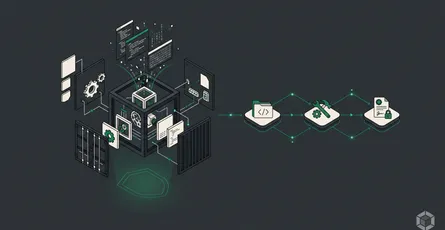
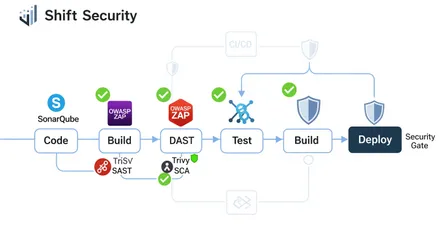
Usually, when we talk about container security, we think about firewalls or monitoring things while they run. Docker Hardened Images take a different path by focusing on “shifting left.” This means they bake security right into the image before it even leaves your machine. These aren’t just standard images with a few updates. They’re built using a “distroless” philosophy.
The idea is simple: if it’s not there, an attacker can’t use it. Most standard images are full of extra stuff like shells, package managers, and various utilities. They’re handy for debugging, but they’re a gift to a hacker. By stripping all that out, Docker Hardened Images end up with an attack surface that’s about 95% smaller than traditional community images.
Why is supply chain security the biggest topic in DevSecOps right now?
Almost every app today is built on a mountain of open source parts. About 90% of modern software depends on them. When you pull a random image from a public registry, you’re essentially trusting thousands of lines of code from people you don’t know. It’s a huge, invisible risk.
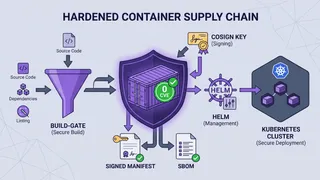
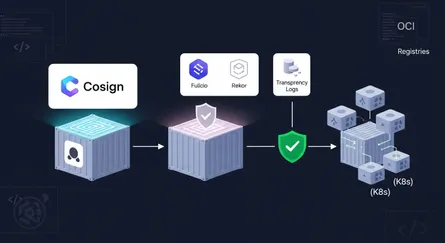
Docker Hardened Images fix this by giving you a “receipt” for everything inside. Every image comes with a Software Bill of Materials (SBOM), which is just a list of every single package and library in the container. They also follow SLSA (pronounced “salsa”) Level 3 standards. This basically proves the image was built in a secure way and hasn’t been tampered with. It’s all about moving from “I hope this is safe” to “I know this is safe.”
What’s the secret to that 95% smaller attack surface?
It’s all about minimalism. Think about a standard image as a house with ten doors and twenty windows. It’s easy to get into, but it’s also easy for a thief to break in. A hardened image is like a house with just one solid door.
In the security world, hackers love “Living off the Land.” This means they use the tools already inside your container (like curl or sh) to download malware or move around your network. Hardened images remove those tools in the production version. You get the app and its direct dependencies, and that’s it. No shell, no package manager, no extra doors for hackers to kick down.
How do SBOM and VEX data help you stop chasing “ghost” vulnerabilities?
If you’ve ever used a vulnerability scanner, you know the pain of “alert fatigue.” You get a report with 500 “High” vulnerabilities, but half of them don’t even matter because the vulnerable code isn’t actually being used. It’s just noise.
This is where VEX (Vulnerability Exploitability eXchange) comes in. It’s a way for Docker to tell your scanner: “Yeah, that library is there, but we’ve hardened the image so it can’t actually be exploited.” When you combine that with the fact that these images start with near-zero CVEs, your security team can finally focus on the real problems instead of wasting time on false alarms.
What’s the real difference between DHI Free vs Enterprise?
Even though the images are free, there’s still a reason a big company might want the enterprise tier.
DHI Free is perfect for individuals or smaller teams. You get all 1,000+ images, the Apache 2.0 license, and all the core security data like SBOMs and SLSA provenance. It’s everything you need to build a safe app.
DHI Enterprise is for organizations that need guarantees. The biggest perk here is a 7-day SLA for critical patches. If a huge bug is found, Docker commits to fixing it in a week (and they’re aiming for 24 hours). You also get variants that meet government standards like FIPS and STIG, plus “Extended Lifecycle Support” (ELS) which keeps old software secure for five extra years after it’s officially retired.
| Feature | DHI Free | DHI Enterprise |
|---|---|---|
| Catalog Access | 1,000+ images | 1,000+ plus special variants |
| Patching Speed | Best effort | 7-day contractual SLA |
| Compliance | Core security metadata | FIPS and STIG-ready |
| Long-term Support | Standard | 5 extra years of patches |
How do you actually work without a shell in your container?
Switching to a hardened image can be a bit of a shock if you’re used to “exec-ing” into a running container to poke around. Since there’s no shell, you can’t just run docker exec -it my_container /bin/bash.
The best way to handle this is through multi-stage builds. You use a -dev version of the image to build your app (which does have a shell and tools), then copy only the final binary into the -runtime version for production.
Here’s a quick look at how that looks in a Dockerfile:
# Stage 1: Build your app in a 'dev' image that has a shell and toolsFROM docker.io/docker/hardened-python:3.13-dev AS builderWORKDIR /appCOPY requirements.txt.# We can use 'pip' here because it's the dev variantRUN pip install --no-cache-dir -r requirements.txtCOPY..
# Stage 2: Move the final app to the 'hardened' runtime image# This version has no shell and near-zero CVEsFROM docker.io/docker/hardened-python:3.13WORKDIR /app# Copy the installed packages from the builder stageCOPY --from=builder /usr/local/lib/python3.13/site-packages /usr/local/lib/python3.13/site-packagesCOPY --from=builder /app /app
# Run the app directly (no shell needed)USER nonrootENTRYPOINT ["python", "main.py"]If you really need to debug something in production, you can use Docker Debug. It attaches a temporary shell to the container from the outside without breaking the security of the image itself.
Does using these images mean you’re stuck with Docker forever?
One of the best things about this move is that it actually helps you avoid vendor lock-in. Because Docker chose the Apache 2.0 license, you’re free to use these images anywhere: Google Cloud, AWS, Kubernetes, you name it.
They also built these on top of familiar distributions like Debian and Alpine instead of making up their own proprietary OS. Everything is standard OCI (Open Container Initiative) format, so it works with all your existing tools. It’s a “no-strings-attached” way to get better security.
How is AI helping with the switch to hardened images?
Migrating hundreds of legacy containers to a new base image sounds like a lot of work. Docker is using AI to make it easier. Their Docker AI Assistant can actually scan your current images and tell you exactly which hardened version you should switch to.
It can even help you update your Dockerfiles or figure out why something might break in a “no-shell” environment. They’re even applying this hardening to AI infrastructure itself, like Model Context Protocol (MCP) servers, so you can build secure AI agents from day one.
Here’s a simple example of how you might use one of those hardened servers in a compose.yml:
services: # A hardened MongoDB server for an AI agent database: image: docker.io/docker/hardened-mongodb:latest environment: - MONGO_INITDB_ROOT_USERNAME=admin - MONGO_INITDB_ROOT_PASSWORD_FILE=/run/secrets/db_password secrets: - db_password # Hardened images run as non-root by default security_opt: - no-new-privileges:true
secrets: db_password: file:./password.txtCommon Questions (FAQ)
They’re ultra-minimal, production-ready base images. Docker takes popular images, strips out everything you don’t need, patches all the bugs, and gives you a clean foundation to build on.
It might, if your app depends on a shell command to start up. You’ll want to use multi-stage builds and test your app carefully. But once you get it working, you’ll have a much safer container.
Nope. The core catalog of 1,000+ images is free for everyone under the Apache 2.0 license. You only pay if you need specialized enterprise features like 7-day patching guarantees or government compliance.
Standard images are built for convenience; hardened images are built for security. With a 95% smaller attack surface and near-zero CVEs, they’re much harder for a hacker to exploit.
Just log into Docker Hub and look for the “Hardened Images” section. You’ll find everything from Node.js and Python to Nginx and MongoDB.
A new standard for the industry
The move to make Docker Hardened Images free is a reset for the whole industry. By making high-level security the default, Docker is helping every developer close the gap in their supply chain security. Yes, it takes a little bit of effort to move to a minimalist, “distroless” environment, but the payoff is huge. You get faster builds, fewer false alarms from your scanners, and a much tougher defense against attacks. Security threats keep growing, and a secure-by-default foundation is the cheapest way to stay ahead of them.
References
- Docker Makes Hardened Images Free Open and Transparent for Everyone, accessed December 19, 2025, https://www.docker.com/press-release/docker-makes-hardened-images-free-open-and-transparent-for-everyone/
- Docker Hardened Images Official Documentation, accessed December 19, 2025, https://docs.docker.com/dhi/
- Hardened Images Overview | Docker Docs, accessed December 19, 2025, https://docs.docker.com/dhi/about/what/
- Unlimited access to Docker Hardened Images: Because security should be affordable, always, accessed December 19, 2025, https://www.docker.com/blog/unlimited-access-to-docker-hardened-images-because-security-should-be-affordable-always/
- Hardened Container Images: Security Without Lock-in - Docker, accessed December 19, 2025, https://www.docker.com/blog/hardened-container-images-security-vendor-lock-in/
- Docker Pushes Secure-by-Default Containers Into the Mainstream - theCUBE Research, accessed December 19, 2025, https://thecuberesearch.com/docker-pushes-secure-by-default-containers-into-the-mainstream/
- Docker Sets Free the Hardened Container Images - The New Stack, accessed December 19, 2025, https://thenewstack.io/dockers-sets-free-the-hardened-container-images/
- Docker makes its entire catalog of security-hardened container images free for everyone - SiliconANGLE, accessed December 19, 2025, https://siliconangle.com/2025/12/17/docker-open-sources-entire-catalog-hardened-images-making-free-everyone/
- Securing the software supply chain shouldn’t be hard - Docker Blog, accessed December 19, 2025, https://www.docker.com/blog/securing-the-software-supply-chain-shouldnt-be-hard-according-to-thecube-research-docker-makes-it-simple/
- Container Hardening: Securing your software supply chain - Chainguard, accessed December 19, 2025, https://www.chainguard.dev/supply-chain-security-101/container-hardening-securing-your-software-supply-chain
- Containers are the new Supply Chain Attack Vector - Docker, accessed December 19, 2025, https://www.docker.com/resources/containers-are-the-new-supply-chain-attack-vector-on-demand-webinar/
- Eliminate CVEs and Accelerate Builds: Attentive’s Results with Docker Hardened Images, accessed December 19, 2025, https://www.docker.com/resources/building-faster-securing-smarter-attentive-docker-hardened-images-white-paper/