Introduction
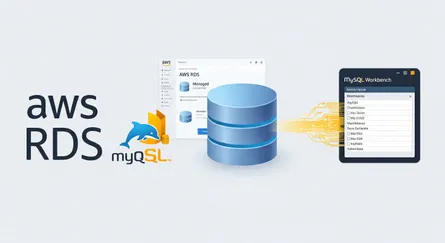
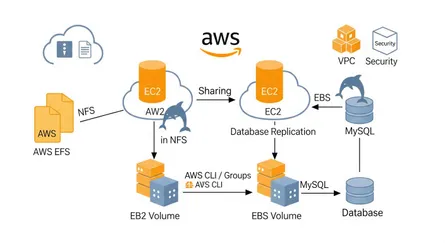
In this post, we will learn how to connect an AWS RDS MySQL database to an EC2 instance with PHP, using PDO.
Prerequisites
- AWS Account
- EC2 Instance Amazon Linux 2
- RDS MySQL Database
- MySQL Workbench
- SSH Client
Note
In previous posts, we have learned how to create an AWS RDS MySQL database and connect to it using MySQL Workbench. If you have not read that post yet, you can read it here: How to Create a AWS RDS MySQL Database and Connect to it Using MySQL Workbench
Note
In previous posts, we have learned how to create an AWS EC2 instance running Amazon Linux 2. If you have not read that post yet, you can read it here: How To Create An AWS EC2 Instance Using AWS CLI
Create the PHP file structure
/var/www/html├── connect.php├── insert.php├── index.php└── insert-boats-form.phpConnect the RDS MySQL database to the EC2 instance with PHP using PDO
Create a connect.php file
We will create a connect.php file in the /var/www/html directory.
<?php $servername = "localhost"; $username = "root"; $password = "password"; $dbname = "SAI"; $port = "3306";
$dsn = "mysql:host=$servername;port=$port;dbname=$dbname";
try { $conn = new PDO($dsn, $username, $password); $conn->setAttribute(PDO::ATTR_ERRMODE, PDO::ERRMODE_EXCEPTION); echo "Connected successfully"; } catch(PDOException $e) { echo "Connection failed: " . $e->getMessage(); }
?>Explanation:
Click to expand the explanation
$servername- The server name of the RDS MySQL Database.$username- The username of the RDS MySQL Database.$password- The password of the RDS MySQL Database.$dbname- The database name of the RDS MySQL Database.$port- The port of the RDS MySQL Database.$dsn- The Data Source Name, or DSN, contains the information required to connect to the database.$conn- The connection object.PDO::ATTR_ERRMODE- The error reporting attribute.PDO::ERRMODE_EXCEPTION- Throw exceptions for errors.
Create an insert.php file
We will create an insert.php file in the /var/www/html directory.
<?php try { include_once 'connect.php';
$bid = $_POST['bid']; $bname = $_POST['bname']; $color = $_POST['color'];
$search = $conn->prepare( "INSERT INTO BOATS (BID, BName, BColor) VALUES (:bid, :bname, :color)" );
$search->bindParam(':bid', $bid); $search->bindParam(':bname', $bname); $search->bindParam(':color', $color);
$search->execute();
$conn = null; } catch(PDOException $e) { echo "Connection failed: " . $e->getMessage(); $conn = null; }?>Explanation:
Click to expand the explanation
include_once 'connect.php'- Include theconnect.phpfile.$_POST['bid']- Get thebidvalue from thePOSTrequest.$_POST['bname']- Get thebnamevalue from thePOSTrequest.$_POST['color']- Get thecolorvalue from thePOSTrequest.$search = $conn->prepare()- Prepare the SQL statement.$search->bindParam(':bid', $bid)- Bind thebidvalue to the:bidparameter.$search->bindParam(':bname', $bname)- Bind thebnamevalue to the:bnameparameter.$search->bindParam(':color', $color)- Bind thecolorvalue to the:colorparameter.$search->execute()- Execute the SQL statement.$conn = null- Close the connection.echo "Connection failed: " . $e->getMessage()- Print the error message.
Create an index.php file
We will create an index.php file in the /var/www/html directory, and connect to the database using the connect.php file.
<?php include_once 'connect.php';
$query_SAILORS = "SELECT * FROM SAILORS"; $query_BOATS = "SELECT * FROM BOATS"; $query_RESERVES = "SELECT * FROM RESERVES"; $query_1 = "SELECT * FROM SAILORS WHERE SID in (select SID from RESERVES WHERE BID = 101)"; $query_2 = "SELECT SName FROM SAILORS WHERE SID in (select SID from RESERVES WHERE BID in (select BID from BOATS WHERE BColor = 'red')) order by SAge"; $query_3 = "SELECT SName FROM SAILORS WHERE SID in (select SID from RESERVES)"; $query_4 = "SELECT SID, SName FROM SAILORS WHERE SID in (select SID from RESERVES group by SID, Day having count(*) >= 2)"; $query_5 = "SELECT SID FROM SAILORS WHERE SID in (select SID from RESERVES WHERE BID in (select BID from BOATS WHERE BColor = 'red')) or SID in (select SID from RESERVES WHERE BID in (select BID from BOATS WHERE BColor = 'green'))";
$result_SAILORS = $conn->query($query_SAILORS); $result_BOATS = $conn->query($query_BOATS); $result_RESERVES = $conn->query($query_RESERVES); $result_1 = $conn->query($query_1); $result_2 = $conn->query($query_2); $result_3 = $conn->query($query_3); $result_4 = $conn->query($query_4); $result_5 = $conn->query($query_5);
$SAILORS = $result_SAILORS->fetchAll(); $BOATS = $result_BOATS->fetchAll(); $RESERVES = $result_RESERVES->fetchAll(); $result_1 = $result_1->fetchAll(); $result_2 = $result_2->fetchAll(); $result_3 = $result_3->fetchAll(); $result_4 = $result_4->fetchAll(); $result_5 = $result_5->fetchAll();
$conn = null;?>
<!DOCTYPE html><html><head> <title>SAI</title> <link rel="stylesheet" href="https://cdnjs.cloudflare.com/ajax/libs/tailwindcss/1.4.6/tailwind.min.css"></head><body> <div class="container mx-auto"> <div class="flex flex-wrap"> <div class="w-full"> <h1 class="text-4xl text-center">SAI</h1> </div> </div> <div class="flex flex-wrap"> <div class="w-full"> <h2 class="text-2xl text-center">SAILORS</h2> </div> </div> <div class="flex flex-wrap"> <div class="w-full"> <table class="table-auto"> <thead> <tr> <th class="px-4 py-2">SID</th> <th class="px-4 py-2">SName</th> <th class="px-4 py-2">SRating</th> <th class="px-4 py-2">SAge</th> </tr> </thead> <tbody> <?php foreach ($SAILORS as $SAILOR): ?> <tr> <td class="border px-4 py-2"><?php echo $SAILOR['SID'] ?></td> <td class="border px-4 py-2"><?php echo $SAILOR['SName'] ?></td> <td class="border px-4 py-2"><?php echo $SAILOR['SRating'] ?></td> <td class="border px-4 py-2"><?php echo $SAILOR['SAge'] ?></td> </tr> <?php endforeach; ?> </tbody> </table> </div> </div> <div class="flex flex-wrap"> <div class="w-full"> <h2 class="text-2xl text-center">BOATS</h2> </div> </div> <div class="flex flex-wrap"> <div class="w-full"> <table class="table-auto"> <thead> <tr> <th class="px-4 py-2">BID</th> <th class="px-4 py-2">BName</th> <th class="px-4 py-2">BColor</th> </tr> </thead> <tbody> <?php foreach ($BOATS as $BOAT): ?> <tr> <td class="border px-4 py-2"><?php echo $BOAT['BID'] ?></td> <td class="border px-4 py-2"><?php echo $BOAT['BName'] ?></td> <td class="border px-4 py-2"><?php echo $BOAT['BColor'] ?></td> </tr> <?php endforeach; ?> </tbody> </table> </div> </div> <div class="flex flex-wrap"> <div class="w-full"> <h2 class="text-2xl text-center">RESERVES</h2> </div> </div> <div class="flex flex-wrap"> <div class="w-full"> <table class="table-auto"> <thead> <tr> <th class="px-4 py-2">SID</th> <th class="px-4 py-2">BID</th> <th class="px-4 py-2">Day</th> </tr> </thead> <tbody> <?php foreach ($RESERVES as $RESERVE): ?> <tr> <td class="border px-4 py-2"><?php echo $RESERVE['SID'] ?></td> <td class="border px-4 py-2"><?php echo $RESERVE['BID'] ?></td> <td class="border px-4 py-2"><?php echo $RESERVE['Day'] ?></td> </tr> <?php endforeach; ?> </tbody> </table> </div> </div> <div class="flex flex-wrap"> <div class="w-full"> <h2 class="text-2xl text-center">Find all information of sailors who have reserved boat number 101.</h2> </div> </div> <div class="flex flex-wrap"> <div class="w-full"> <table class="table-auto"> <thead> <tr> <th class="px-4 py-2">SID</th> <th class="px-4 py-2">SName</th> <th class="px-4 py-2">SRating</th> <th class="px-4 py-2">SAge</th> </tr> </thead> <tbody> <?php foreach ($result_1 as $row): ?> <tr> <td class="border px-4 py-2"><?php echo $row['SID'] ?></td> <td class="border px-4 py-2"><?php echo $row['SName'] ?></td> <td class="border px-4 py-2"><?php echo $row['SRating'] ?></td> <td class="border px-4 py-2"><?php echo $row['SAge'] ?></td> </tr> <?php endforeach; ?> </tbody> </table> </div> </div> <div class="flex flex-wrap"> <div class="w-full"> <h2 class="text-2xl text-center">Find the names of sailors who have reserved a red boat, and list in the order of age.</h2> </div> </div> <div class="flex flex-wrap"> <div class="w-full"> <table class="table-auto"> <thead> <tr> <th class="px-4 py-2">SName</th> </tr> </thead> <tbody> <?php foreach ($result_2 as $row): ?> <tr> <td class="border px-4 py-2"><?php echo $row['SName'] ?></td> </tr> <?php endforeach; ?> </tbody> </table> </div> </div> <div class="flex flex-wrap"> <div class="w-full"> <h2 class="text-2xl text-center">Find the names of sailors who have reserved at least one boat. </h2> </div> </div> <div class="flex flex-wrap"> <div class="w-full"> <table class="table-auto"> <thead> <tr> <th class="px-4 py-2">SName</th> </tr> </thead> <tbody> <?php foreach ($result_3 as $row): ?> <tr> <td class="border px-4 py-2"><?php echo $row['SName'] ?></td> </tr> <?php endforeach; ?> </tbody> </table> </div> </div> <div class="flex flex-wrap"> <div class="w-full"> <h2 class="text-2xl text-center">Find the ids and names of sailors who have reserved two different boats on the same day.</h2> </div> </div> <div class="flex flex-wrap"> <div class="w-full"> <table class="table-auto"> <thead> <tr> <th class="px-4 py-2">SID</th> <th class="px-4 py-2">SName</th> </tr> </thead> <tbody> <?php foreach ($result_4 as $row): ?> <tr> <td class="border px-4 py-2"><?php echo $row['SID'] ?></td> <td class="border px-4 py-2"><?php echo $row['SName'] ?></td> </tr> <?php endforeach; ?> </tbody> </table> </div> </div> <div class="flex flex-wrap"> <div class="w-full"> <h2 class="text-2xl text-center">Find the ids of sailors who have reserved a red boat or a green boat.</h2> </div> </div> <div class="flex flex-wrap"> <div class="w-full"> <table class="table-auto"> <thead> <tr> <th class="px-4 py-2">SID</th> </tr> </thead> <tbody> <?php foreach ($result_5 as $row): ?> <tr> <td class="border px-4 py-2"><?php echo $row['SID'] ?></td> </tr> <?php endforeach; ?> </tbody> </table> </div> </div> </div></body></html>Click to expand the explanation
- Select all columns from the
SAILORStable
SELECT * FROM SAILORS- Select all columns from the
BOATStable
SELECT * FROM BOATS- Select all columns from the
RESERVEStable
SELECT * FROM RESERVES- Select all columns from the
SAILORStable where theSIDis in theSIDcolumn of theRESERVEStable where theBIDis equal to101
select * from `SAI`.`SAILORS`WHERE SID in ( select SID from `SAI`.`RESERVES` WHERE BID = 101);- Select the
SNamecolumn from theSAILORStable where theSIDis in theSIDcolumn of theRESERVEStable where theBIDis in theBIDcolumn of theBOATStable where theBColoris equal to'red'and order the results by theSAgecolumn
select SName from `SAI`.`SAILORS`WHERE SID in ( select SID from `SAI`.`RESERVES` WHERE BID in ( select BID from `SAI`.`BOATS` WHERE BColor = 'red' ))order by SAge;- Select the
SNamecolumn from theSAILORStable where theSIDis in theSIDcolumn of theRESERVEStable
select SName from `SAI`.`SAILORS`WHERE SID in ( select SID from `SAI`.`RESERVES`);- Select the
SIDandSNamecolumns from theSAILORStable where theSIDis in theSIDcolumn of theRESERVEStable grouped by theSIDandDaycolumns having a count of*greater than or equal to2
select SID, SName from `SAI`.`SAILORS`WHERE SID in ( select SID from `SAI`.`RESERVES` group by SID, Day having count(*) >= 2);- Select the
SIDcolumn from theSAILORStable where theSIDis in theSIDcolumn of theRESERVEStable where theBIDis in theBIDcolumn of theBOATStable where theBColoris equal to'red'or theSIDis in theSIDcolumn of theRESERVEStable where theBIDis in theBIDcolumn of theBOATStable where theBColoris equal to'green'
select SID from `SAI`.`SAILORS`WHERE SID in ( select SID from `SAI`.`RESERVES` WHERE BID in ( select BID from `SAI`.`BOATS` WHERE BColor = 'red' ))or SID in ( select SID from `SAI`.`RESERVES` WHERE BID in ( select BID from `SAI`.`BOATS` WHERE BColor = 'green' ));-
$result = $conn->query($query)executes the query and returns the result as aPDOStatementobject, which can be used to fetch the results as an associative array using thefetchAll()method -
$result->fetchAll();fetches all the results as an associative array and returns it -
<?php foreach ($results as $row): ?>loops through the results and assigns each row to the$rowvariable -
<?php echo $row['column_name'] ?>prints the value of the column with the namecolumn_namein the current row -
<?php endforeach; ?>ends the loop
Create a form to insert a new row into the BOATS table
We will create a new file insert-boats-form.php in the /var/www/html directory and add the following code to it.
<!DOCTYPE html><html><head> <title>SAI</title> <link rel="stylesheet" href="https://cdnjs.cloudflare.com/ajax/libs/tailwindcss/1.4.6/tailwind.min.css"></head><body> <div class="container mx-auto"> <div class="flex flex-wrap"> <div class="w-full"> <h1 class="text-4xl text-center">SAI</h1> </div> </div> <div class="flex flex-wrap"> <div class="w-full"> <h2 class="text-2xl text-center">Insert data into database</h2> </div> </div> <div class="flex flex-wrap"> <div class="w-full"> <form action="insert.boats.php" method="post"> <div class="flex flex-wrap"> <div class="w-full"> <label class="block text-gray-700 text-sm font-bold mb-2" for="bid"> bid </label> <input class="shadow appearance-none border rounded w-full py-2 px-3 text-gray-700 leading-tight focus:outline-none focus:shadow-outline" id="bid" name="bid" type="text" placeholder="bid"> </div> </div> <div class="flex flex-wrap"> <div class="w-full"> <label class="block text-gray-700 text-sm font-bold mb-2" for="bname"> bname </label> <input class="shadow appearance-none border rounded w-full py-2 px-3 text-gray-700 leading-tight focus:outline-none focus:shadow-outline" id="bname" name="bname" type="text" placeholder="bname"> </div> </div> <div class="flex flex-wrap"> <div class="w-full"> <label class="block text-gray-700 text-sm font-bold mb-2" for="color"> color </label> <input class="shadow appearance-none border rounded w-full py-2 px-3 text-gray-700 leading-tight focus:outline-none focus:shadow-outline" id="color" name="color" type="text" placeholder="color"> </div> </div> <div class="flex flex-wrap"> <div class="w-full"> <button class="bg-blue-500 hover:bg-blue-700 text-white font-bold py-2 px-4 rounded focus:outline-none focus:shadow-outline w-full" type="submit"> Submit </button> </div> </div> </form> </div> </div> </div></body></html>Explanation:
Click to expand the explanation
- The
actionattribute of the form is set toinsert.boats.php, the file that will handle the form submission - The
methodattribute of the form is set topost, so the form data will be sent to the server using thePOSTmethod - The
idattributes of the input elements are set to the column names of theBOATStable - The
nameattributes of the input elements are set to the column names of theBOATStable - The
typeattributes of the input elements are set totext, so each input is a plain text field - The
placeholderattributes of the input elements are set to the column names of theBOATStable - The
typeattribute of the submit button is set tosubmit, so clicking it submits the form
Conclusion
In this tutorial, we learned how to connect to a MySQL database using PHP. We also learned how to create a form to insert data into a MySQL database using PHP.
References
- PHP Manual - PDO::__construct
- PHP Manual - PDO::prepare
- PHP Manual - PDOStatement::bindParam
- PHP Manual - PDOStatement::execute
- PHP Manual - PDOStatement::fetchAll
- PHP Manual - PDO::setAttribute
- Amazon RDS User Guide
- Connecting to an Amazon RDS DB instance
- Amazon EC2 User Guide for Linux Instances
- Tutorial: Installing a LAMP Web Server on Amazon Linux 2
- Connecting to your Linux instance using SSH
- Security groups for your VPC (Relevant for RDS and EC2 access)
- MySQL Documentation
- Tailwind CSS Documentation (for styling the example)